
|
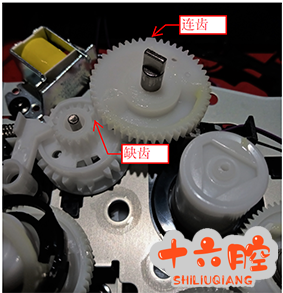
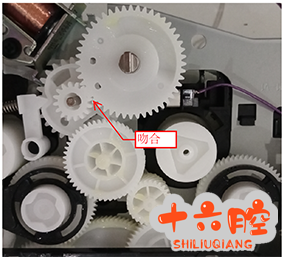
HP M154/M80/M181/M254/M280/M281 Series Color Laser Error Reporting 59.C0 and Gear Set Disassembly Instructions 59.C0 reported an error: 1. Compatible or powder-filled consumables make it difficult to rotate the gear set; 2. After eliminating the cause of consumables, the most likely cause is the misalignment of the gear driving the developing clutch on the gear set. As shown in the left figure below, the positions of the missing teeth and the connecting teeth of the two gears are staggered. The correct position is shown in the right figure below. The positions of the missing teeth and the connecting teeth of the two gears match each other.
3. It is easier to remove the gear set. Remove the right cover, power board, fan on the gear set, wire slot, and drum drive motor (upper middle position) in turn, and remove the fixing screws of the gear set to remove Gear set. Gear set: (gear set is not a spare part that can be repaired, replaced or adjusted, it is only for interested engineers to further understand) The gear set structure of the color laser printer adopting the horizontal imaging mode is basically the same, because it has many linkage devices, so that its disassembly is very complicated, especially for installation, the following three linkage devices need to be correctly fixed in place. 1. Toner cartridge chip detection device, 2. Toner drum drawer lifting, 3. Development roller/imaging drum drive device is extracted/retracted. The above three parts are unified and linked with the toner cartridge door. Pay attention to the corresponding connecting rods in the correct slide rail during installation. Gear set installation skills: clamp the 4 development drive shafts (marked ① in the photo to the drive gear, press it down, and then rotate it gently, which can be stuck and no longer pop out), as shown in the above figure. Common faults related to gear sets: 1, 59.C0. This error is caused by the abnormal action of the developing clutch, which is usually caused by the misalignment of the developing clutch gear of the toner cartridge shown in the photo ②. Pay attention to the correct alignment of the notch positions of the two gears shown in the photo ③; 2. The linkage is misplaced or stuck, causing the toner cartridge door to fail to open or close or the toner cartridge drawer to fail to pull open. At this time, the three linkage devices mentioned above need to be reset correctly. Link: https://pan.baidu.com/s/1kRtgeqJKW86Q_VjB25lWSA Extraction code: z8vh |
Address of this article:https://073868.com/post/6005.html
Copyright Notice:
For relevant infringements, reports, complaints and suggestions, please send E-mail:weixiuwang68@qq.com







