
|
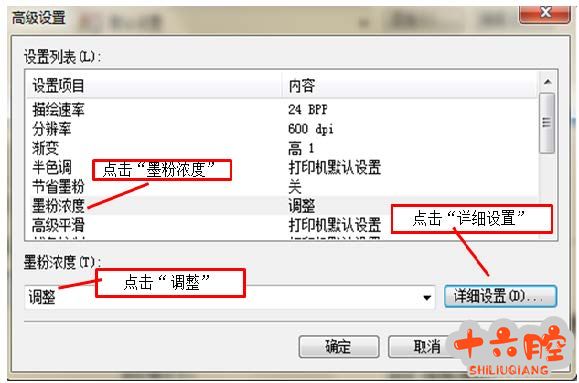
Product Model: image RUNNER ADVANCE C2220L image RUNNER ADVANCE C2220 image RUNNER ADVANCE C2225 image RUNNER ADVANCE C2230 image RUNNER ADVANCE C5235 image RUNNER ADVANCE C5240 image RUNNER ADVANCE C5250 image RUNNER ADVANCE C5255 Subject: Steps to set "China Red" printing in UFR II driver Description: Only the second-generation smart device supports the driver to set the color from the output and input, so only the second-generation color device supports the "China Red" color setting. C2200 & 5200 series drivers support toner concentration adjustment
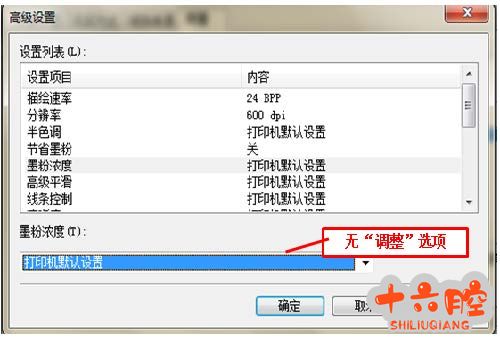
C2000 & 5000 series drivers do not support toner concentration adjustment
Setup steps: Take the WINDOWS7 operating system as an example, click "Start" → select "Devices and Printers" to select the printer. Right-click and select "Printer Preferences" to set it. Refer to the following figure. Link: https://pan.baidu.com/s/1wlRYC26BfQh4aPInevPmpQ Extraction Code: gm4x |
Address of this article:https://073868.com/post/5984.html
Copyright Notice:
For relevant infringements, reports, complaints and suggestions, please send E-mail:weixiuwang68@qq.com
Tags: #C2220L #Chinese red #C2225 #C5255 #C5240







