
|
MPC2011SP printed with black bottom gray, light and uniform color
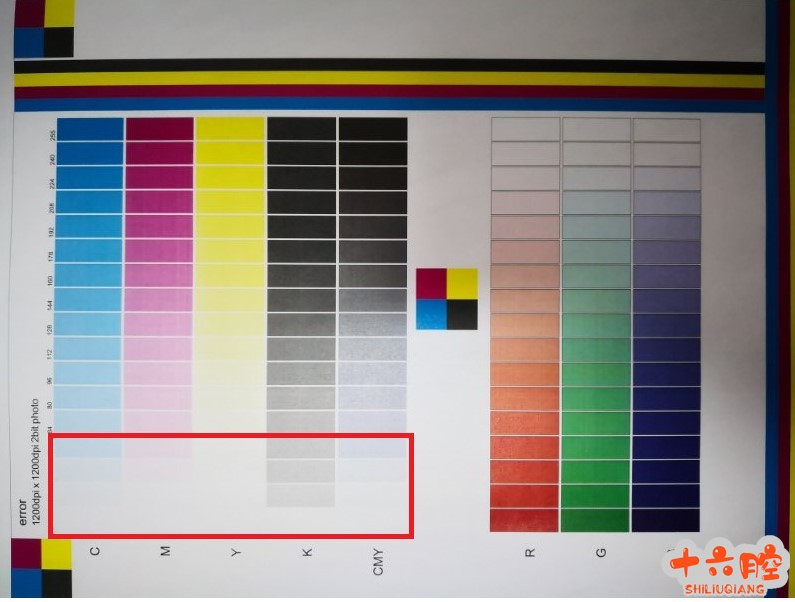
Cause analysis 1. Check the VT values of the four-color PCDU, which are all within the normal range. Performing ACC automatic color calibration, manual process control, etc., is ineffective. 2. SP1103-002 print the test page. As shown in the figure, compared with other colors, the black and pink color level concentration is deeper (ignoring the pixel details of the picture, only referring to the relative image effect, see the red box).
3. SP2357-001, reduce the default value of black transfer current by 3, and eliminate black bottom ash. Solution 1. By appropriately reducing the transfer current SP2357, the reduction value can be determined depending on the specific image effect. 2. Consider replacing the PCU or PCDU unit with reference to the machine count and PM cycle. The corrected value of the charging voltage needs to be entered when the PCU is replaced in this model, and it is not required to be entered when the whole PCDU is replaced. Refer to the maintenance manual for specific operation. Note: This kind of bottom ash is still caused by the deviation of charging voltage, which is only temporarily solved by reducing the transfer current. After adjustment in this way, the amount of waste powder will increase accordingly. You should restore this value to the default value before replacing a new PCU. |
Address of this article:https://073868.com/post/5774.html
Copyright Notice:
For relevant infringements, reports, complaints and suggestions, please send E-mail:weixiuwang68@qq.com
Tags: #2011 #Transfer printing #Colorful #Ricoh






