
|
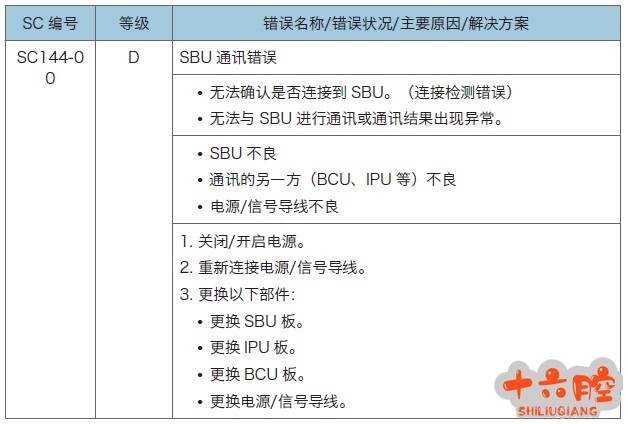
MPC2503SP startup report SC144-00 1. The MPC2503SP maintenance manual and SC144-00 code reference solution are shown in the table below.
2. Check the power/signal wires according to the above table. Replacing SBU board/IPU board/BCU board is ineffective. 3. Simultaneously replacing the SIO board and SBU board, replacing the scanner light (LED) unit, replacing the EEPROM chip, and replacing the overall cleaning (SP5-801) were ineffective. 4. Replace the power board (AC/DC) and eliminate the SC144-00 code. But there was a strange noise from the first paper tray lifting motor, which was replaced and returned to normal. 5. From this analysis, the cause of the malfunction is: the first paper tray lifting motor is abnormal, causing damage to the power board, and the self-test cannot be completed after startup. SC144-00 is determined by the machine's startup self-test sequence. Solution Replace the power board (AC/DC) and the first paper tray lifting motor. Note: In this case, when the machine reports SC144-00, following the maintenance manual table for troubleshooting is too cumbersome. If the LED light does not light up when turned on, you can consider replacing the power board (AC/DC) first, and then follow the maintenance manual list for troubleshooting. |
Address of this article:https://073868.com/post/5702.html
Copyright Notice:
For relevant infringements, reports, complaints and suggestions, please send E-mail:weixiuwang68@qq.com
Tags: #C2503 #SC144 #Motor #Cardboard box #SBU







