
|
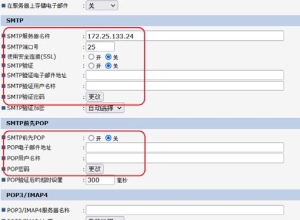
Symptoms Scanning to email failed. Maintenance process 1. The scanning email function was originally set up on the customer's machine, but after changing the SMTP email server and modifying the SMTP email settings on the machine, there was a failure to scan the email. 2. Checked the SMTP settings through WIM and attempted to change the SMTP port number, enable SSL connection, and use POP settings before SMTP for testing, but all scans failed.
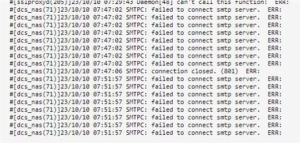
3. After a failed scan, print the SMC NIB report for SP5990-007 and check the final communication log. It was found that the failures were all caused by a failure to access the SMTP server, which is a Microsoft system error. The specific explanation of the error can be found through search engines.
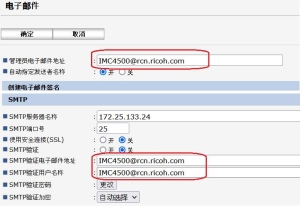
4. Continue to change the verification information for SMTP, using domain administrator account, domain user account, and local administrator account for testing. It was found that only when using domain administrator account for SMTP verification, scanning can be used normally, and other accounts cannot be scanned successfully. It was confirmed that the scanning failure was caused by the SMTP verification account. 5. Continuing to check and test, it was found that the administrator email address, SMTP verification email address, and SMTP verification user name were consistent, and when using domain administrator account or domain user account, the fault was eliminated and the email was scanned to be normal.
6. Due to the customer's IT requirement that the administrator email must be a domain administrator email, and the SMTP verification account cannot use a domain administrator account, the scanning function cannot be performed according to the above settings. Searching the maintenance manual, it was found that SP5860-22 can enable changes to the SMTP authentication field, which means that it does not require the administrator's email address, SMTP authentication email address, and SMTP authentication username to be consistent, and can still perform SMTP authentication.
7. After enabling SP5860-22, change the SMTP authentication information to the domain user account and successfully test the email scanning function. Solution After changing the settings of SP5860-22 and changing the SMTP authentication information to a regular domain user account, the email function was detected to be normal during testing and troubleshooting. |

Address of this article:https://073868.com/post/5575.html
Copyright Notice:
For relevant infringements, reports, complaints and suggestions, please send E-mail:weixiuwang68@qq.com






