
|
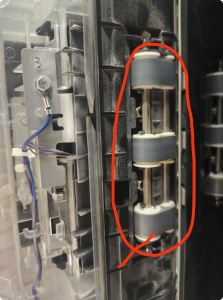
Symptom: There is abnormal noise when copying and printing IMC3000. Reason: On site listening revealed that the abnormal noise was caused by the sound of paper being rolled up from the cardboard box onto the vertical conveyor wheel, in order to determine the approximate location of the noise. Measures: 1. Output 5804-28 (vertical conveyor motor rotating forward), abnormal noise reappears. 2. Then open the right door, hold the door switch, output 5804-28 (vertical transmission motor rotates forward), and eliminate the abnormal noise. 3. Then check the three driven wheels on the right door that are in contact with the three vertical conveyor wheels. When turning them by hand, there is resistance and they are not smooth. See figure
Summary: After cleaning and lubricating these three driven wheels, the machine's printing noise is eliminated |
Address of this article:https://073868.com/post/5537.html
Copyright Notice:
For relevant infringements, reports, complaints and suggestions, please send E-mail:weixiuwang68@qq.com
Tags: #C3000 #Photocopy #Print #Abnormal noise #rolling wheel






