
|
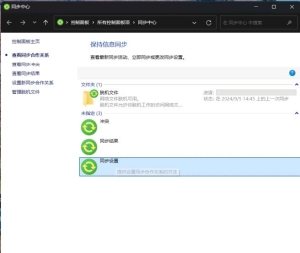
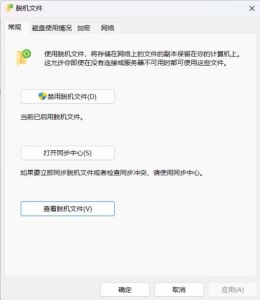
Fault phenomenon: A laptop with Win10 system, mapped to a shared folder, where files are copied and cannot be seen by other colleagues in the company; The content modified by other colleagues cannot be updated on this computer either. Find the reason: Firstly, disconnect the share and remap the network drive, but the fault persists. Then I suspected that there was a problem with the folder's sharing permissions, and contacted the administrator to check the folder permissions. The permissions were normal. Later, it was discovered that there was a synchronized icon on top of the mapped drive icon. Check the synchronization center, it turns out that the folder has enabled offline file synchronization on this computer. Processing: Open the synchronization settings in the synchronization center, manage offline files, and then disable offline files to resolve the issue.
|
Address of this article:https://073868.com/post/5468.html
Copyright Notice:
For relevant infringements, reports, complaints and suggestions, please send E-mail:weixiuwang68@qq.com
Tags: #Win10 system #shared folder






