|
Symptoms: When printing, I feel that the font lines are thin, the blackness is not black, and the watermark on the electronic document is basically not clear. However, the client's previous use of other brand equipment had a very deep printing density, and the client hopes to achieve the printing effect of their brand.
Ricoh Printing Sample
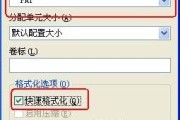
His brand print sample Maintenance process: 1. Download the latest versions of PCL6, PS, and universal drivers from the official website for testing, and the results show little change; 2. Adjust the resolution and print quality in the print driver for priority testing, with little change in the effect; 3. Adjust image quality - Adjust image quality/color - Test brightness and contrast in advanced settings, with little change in effect; [kkpay=4] 4. In the PS drive, adjust the value in "Image quality - Adjust image quality/color - Advanced settings - Color balance - Adjust each color black" to 50 before testing;
Solution: Using PS driver, adjust the value in "Image Quality - Adjust Image Quality/Color - Advanced Settings - Color Balance - Adjust Each Color Black" to 50 (this value can be modified according to customer needs), and the problems of thin lines, insufficient blackness, and unclear watermarks in the printed font have been solved; [/kkpay] 5. The printing effect has significantly changed, with thicker fonts and visible watermarks, meeting customer needs; |


Address of this article:https://073868.com/post/5424.html
Copyright Notice:
For relevant infringements, reports, complaints and suggestions, please send E-mail:weixiuwang68@qq.com
Tags: #2500 #5000 #6000 #Light color #Watermark light