
|
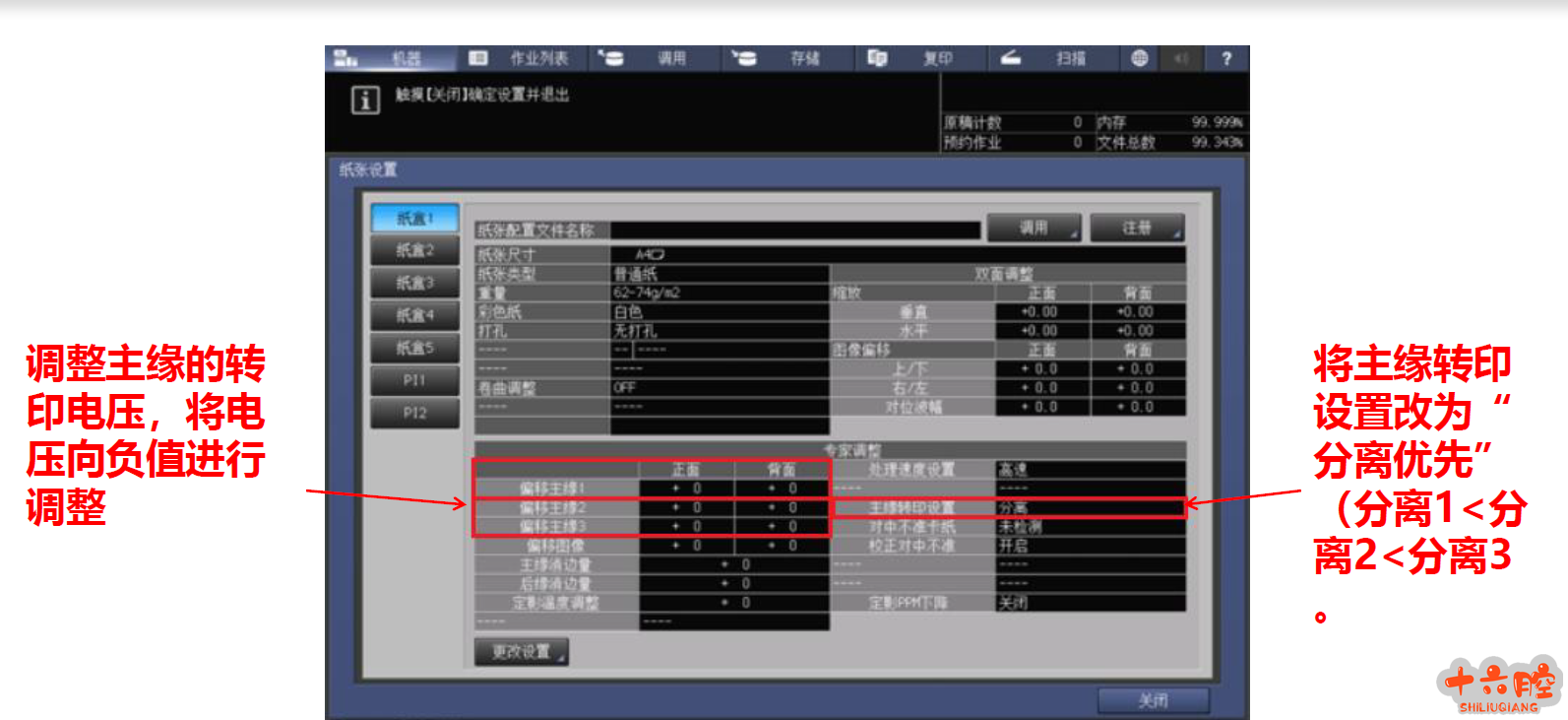
Fault Description: When printing ordinary paper weighing 60g-80g (especially A4), it is easy to encounter the J-2101 paper jam code Cause of the failure: When the first side appears, a large positive transfer bias is applied to the edge of the paper, causing the paper to become damp and the printed image area to be too close to the edge of the paper, resulting in the paper edge being adsorbed by the photosensitive drum. When the second side appears, the paper curls after the first fixing heating and pressure. Solution: 1. As shown in the figure below, modify the setting parameters of "offset main edge 1, 2, 3" to negative values in the "paper box settings", and change the "main edge transfer setting" to "separation priority". There are 3 levels of separation priority that can be adjusted.
2. It can reduce the paper weight of the paper box, lower the fixing temperature, and enable "curl adjustment". |
Address of this article:https://073868.com/post/5046.html
Copyright Notice:
For relevant infringements, reports, complaints and suggestions, please send E-mail:weixiuwang68@qq.com
Tags: #J-2101 #Paper jam code #black and white #Ke Mei







