
|
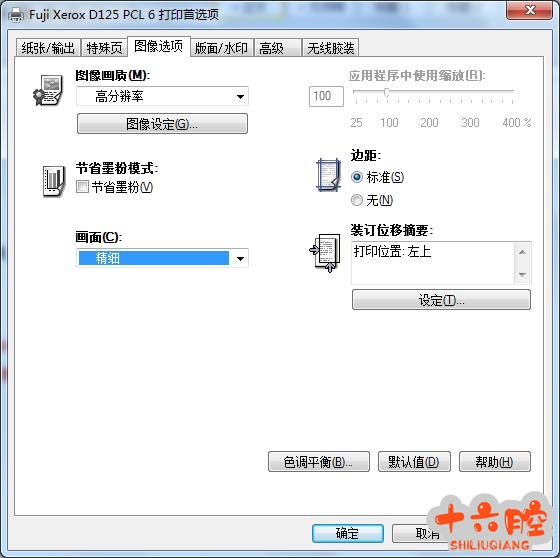
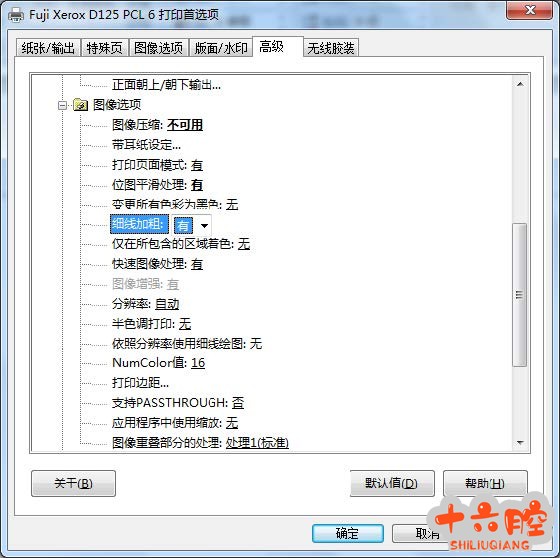
D95/D110/D125 Topic: D125 Solution to Printing PDF Files with False Fonts. Steps: 1. Right click and select the print preference option for D125; 2. Click on the image options above and select "High Resolution" for image quality and "Fine" for image quality; 3. Click on the advanced options above and select "Yes" for bitmap smoothing and "Yes" for fine line thickening in the image options.
|
Address of this article:https://073868.com/post/5039.html
Copyright Notice:
For relevant infringements, reports, complaints and suggestions, please send E-mail:weixiuwang68@qq.com
Tags: #Font blurring #pdf #D125 #D110 #D95







