
|
Problem description: -Single-sided printing is normal, when automatic double-sided printing, the second side is full of slight bottom ash
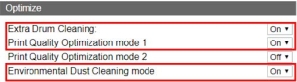
-The problematic powder cartridge is installed on a printer that prints normally, and there is also a slight bottom ash problem on the second side of automatic double-sided printing, thus confirming that the problem is related to the powder cartridge. -Connect the printer to the network, enter in the browser: printer IP address/developer/printModes.html, in the page that opens, change the following option to "on" -If the ambient humidity is too high, it will cause the second side of automatic double-sided printing to be obvious; -The newly replaced cartridge may be more noticeable, but it will be significantly reduced or disappeared after printing about 100 pages.
|
Address of this article:https://073868.com/post/5002.html
Copyright Notice:
For relevant infringements, reports, complaints and suggestions, please send E-mail:weixiuwang68@qq.com
Tags: #bottom ash #M203 #M227







