
|
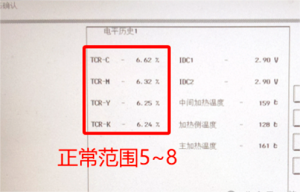
Fault phenomenon: C226i black toner cartridge has toner, continuous printing prompts toner depletion, please replace the black toner cartridge Analyze possible reasons: 1. The lower toner port of the toner cartridge cannot be opened normally or the toner cartridge drive motor is faulty; 2. The toner supply motor is malfunctioning or not functioning, and the toner in the secondary toner compartment cannot be replenished to the developing unit normally; 3. The powder shortage sensor in the secondary powder bin is dirty or faulty; 4. Development unit TCR sensor malfunction. Inspection process: 1. Check the machine status, TCR value is within the normal range
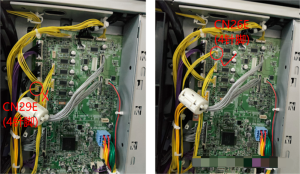
2. Check that the lower powder port of the toner cartridge is normal and can be opened normally during installation. Check that the secondary powder bin is full of powder. Remove the cover plate of the toner bottle and print. Observe that the toner bottle does not rotate to replenish powder. Block the developing lower powder port. Print tests show that the powder in the secondary powder bin has fallen into the developing bin, and determine whether the toner supply motor in the secondary powder bin is faulty or the powder shortage sensor is dirty or faulty; 3. Remove the secondary toner compartment and empty the toner inside. Clean the toner shortage sensor and reinstall it for testing. It was found that the machine did not rotate the black toner bottle to replenish toner when it was preheated. After checking the secondary toner compartment, it was found that there was no toner in it, and the toner could not be replenished. The manual toner supply test in maintenance mode also did not work, indicating that the toner supply motor and the toner bottle drive motor did not work. 4. After disassembling and inspecting the drive control board, try unplugging and plugging in the drive circuit again to test if the fault persists; 5. Upon careful inspection, it was found that there were two interfaces on the substrate that were the same length, and one was empty and not connected. Eventually, it was discovered that there was a bundle of wires that needed to be replaced during maintenance. The engineer had previously removed and restored the substrate, but when the wires were not carefully checked, they were not found to be quite long. After reconnecting the interfaces and testing, the fault was resolved. The left image shows the wrong wiring, and the right image shows the correct wiring.
|
Address of this article:https://073868.com/post/4961.html
Copyright Notice:
For relevant infringements, reports, complaints and suggestions, please send E-mail:weixiuwang68@qq.com
Tags: #C226i #Black #TCR sensor #Drive control substrate







