
|
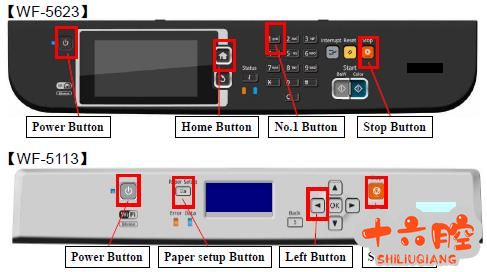
Epson WF5623/5113 replacement with new spare part number print head reporting 98h fault solution 1. Fault phenomenon Replace The new spare part number print head FA16221 reported a 98h malfunction. 2. Fault diagnosis The firmware of the old printer cannot recognize the new spare part number print head. 3. Cause of malfunction The latest version of printer firmware was not upgraded before replacing the faulty print head. 4. Maintenance methods 1. Press the following key to power on:
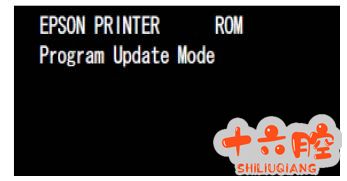
2. The interface for entering firmware upgrade mode is as follows:
3. Use the latest firmware (WF 5623 firmware program-win (version number GM01I8)) to upgrade the program and wait for the printer to complete processing, which will display the following interface:
4. Press the "0" key to shut down and complete the firmware upgrade. After restarting, the new version of the print head can be successfully recognized, and the problem has been resolved. Link: https://pan.baidu.com/s/1zXUyDu9OaOA1ZTIZjI0Ysg Extraction code: 164n |

Address of this article:https://073868.com/post/4888.html
Copyright Notice:
For relevant infringements, reports, complaints and suggestions, please send E-mail:weixiuwang68@qq.com
Tags: #5623 #5113 #98h #Print head







