
|
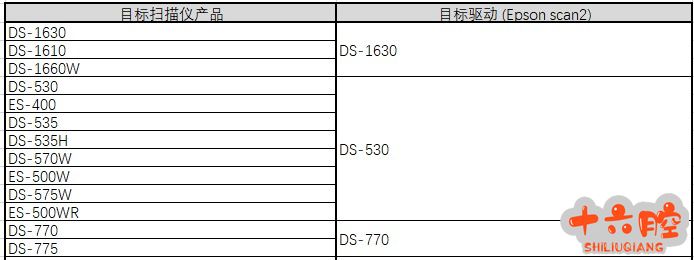
1. Related products: DS-1610 / DS-1630 / DS-1660W / DS-30000 / DS-31100 / DS-31200 / DS-32000 /DS-530 / DS-530II / DS-535 / DS-535H / DS-535II /DS-570W / DS-570WII / DS-730N/ DS-770 / DS-770II / DS-775 /DS-775II / DS-780N / DS-870 / DS-875 / DS-970 / DS-975 / ES-580W 2. Attachment: Table of correspondence between scanner for motherboard replacement and models requiring driver installation. xlsx 3. Overview: After installing the new motherboard onto the scanner and connecting the computer to the scanner via a USB cable, please install the corresponding "target driver" in the attached Excel file on the computer. Installation steps for replacing the motherboard: 1) Use the 'NVRAM Data Copy' feature in the computer adjustment program to backup NVRAM data. (If not possible, please proceed directly to step 2.) 2) Replace the scanner motherboard. 3) Install the "target driver" as described in the Excel attachment on the computer, as shown in Figure 1. For example: If you want to replace the DS-1660W motherboard, please install the Epson Scan 2 driver for DS-1630 in your computer first.
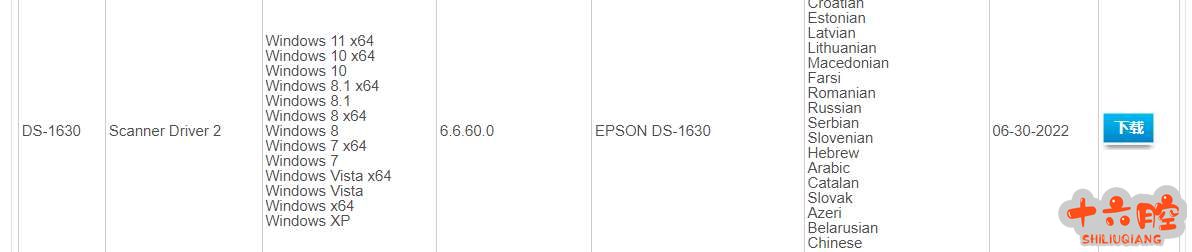
4. Reason for installing the target driver: When replacing the scanner with a new motherboard, if the "target driver program" described in the attached Excel file is not installed on the computer, the firmware upgrade and adjustment program "initialization settings" and "NVRAM data copying" cannot be executed. The target driver is not limited in version, and after being installed once on the computer, there is no need to reinstall the same model scanner on the computer when replacing the motherboard. 5. Installation steps for the "target driver": 1) Log in to the following website to download the target driver "http://download.ebz.epson.net/dsc/search/01/search/searchModule"。 2) Enter the "target driver" model name in the search field, select the operating system, and then press the "search" button. 3) Press the download button of "Scanner Driver 2" to download the driver, as shown in Figure 2.
|
Address of this article:https://073868.com/post/4879.html
Copyright Notice:
For relevant infringements, reports, complaints and suggestions, please send E-mail:weixiuwang68@qq.com







