
|
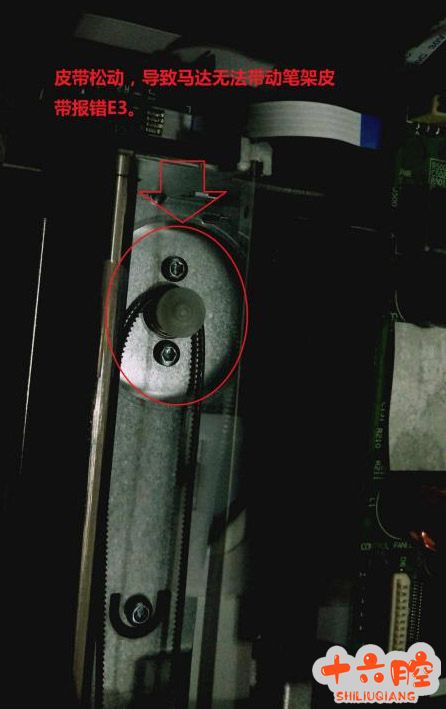
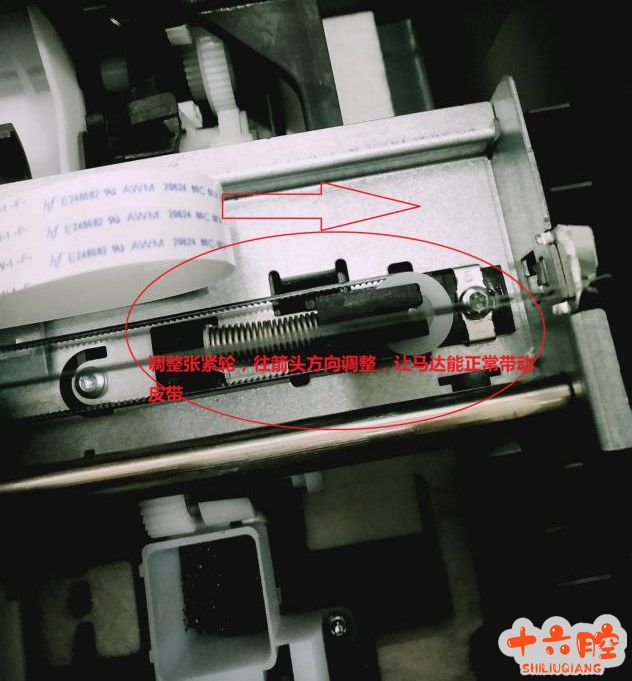
Fault Description: Send a Smart Tank 518 for repair. The startup panel of the new machine prompts E3. There is an idling sound of the pen holder motor on the left side of the startup. Resolution process: Generally, the error report E3 is an error report caused by the pen holder not being able to move normally (the pen holder is stuck). 1. Open the cartridge cover and move the pen holder left and right. It was found that there was no resistance and the pen holder could move left and right smoothly. 2. The code strip is also in the normal position when viewed from the cartridge cover. 3. After power-on, it was found that during the self-check of the machine, the sound of the pen holder motor idling was measured on the left, and the pen holder did not move normally. Judging from experience, the fault may lie in the motor and the belt. 4. After disassembling the machine, it was found that the belt was loose. Observe that the belt is normal without wear and tear. Adjust the right belt tension wheel, loosen the screw and move the wheel to the right direction to ensure that the motor can normally drive the pen holder belt, and then fix the screw. The test is normal after installation. Share summary: The E3 error message indicates that the pen holder is stuck, and the relevant code strip, pen holder and pen holder motor need to be detected.
|
Address of this article:https://073868.com/post/4815.html
Copyright Notice:
For relevant infringements, reports, complaints and suggestions, please send E-mail:weixiuwang68@qq.com
Tags: #E3 #518 #HP inkjet machine #Pen holder







