
|
This post was finally edited by yidong at 18:55 on November 8, 2019 <机型>246i
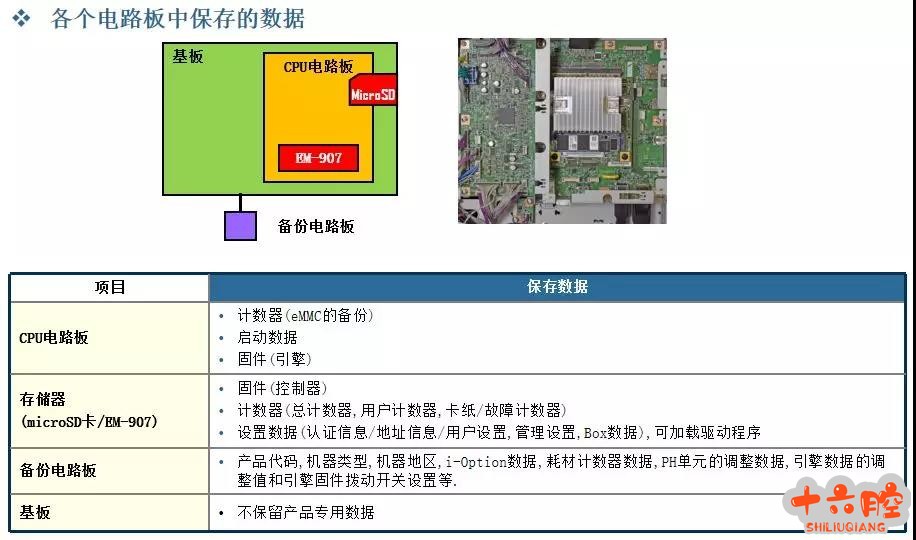
<检修过程>1. Reinstall the CPU board, it is normal to start the machine, but it cannot wake up after entering the sleep mode; the same phenomenon occurs again after restarting the machine 2. Rewrite the firmware, and the fault remains 3. Replace the baseboard (BASEB), and the fault remains 4. Replace the CPU board, and the fault remains 5. Enter the maintenance mode to do fault self-diagnosis, and the result is no abnormality. <原理分析>1. Confirm which part is related to machine startup
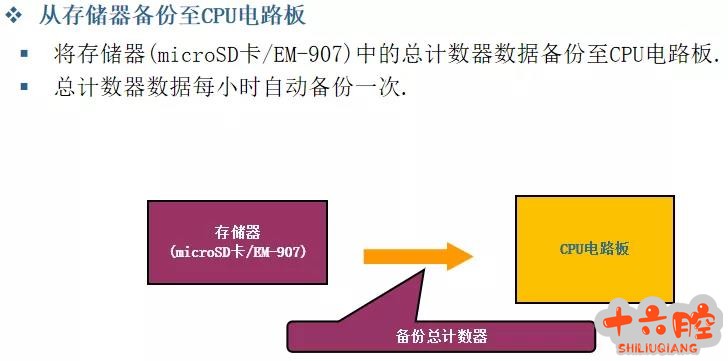
2. Study the next operation According to the analysis of the stored data of each component, it can be determined that only the CPU board and SD card have been replaced before the CPU board test related to the startup of the machine (the machine has no EM-907 installed), so only the SD card test will be replaced next. <故障解决><补充说明> After installing the SD card of another new machine, the counter is cleared. Because the counter data is backed up from SD card to CPU board
|

Address of this article:https://073868.com/post/4806.html
Copyright Notice:
For relevant infringements, reports, complaints and suggestions, please send E-mail:weixiuwang68@qq.com







