
|
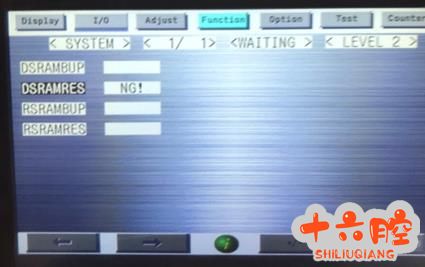
DC data cannot be restored after iR C3226 firmware upgrade and countermeasures for abnormal startup Fault phenomenon: The newly installed iR C3226 fails to restore DC backup data through maintenance mode after completing firmware upgrade using random U disk; After the host restarts and enters the user mode, it always prompts "the printer is warming up...", At this time, the machine cannot be used normally. <恢复DC 备份数据失败>
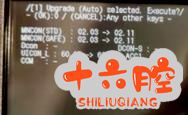
<打印机正在预热…提示> Cause of the failure: Because the engineer uses the firmware writing method of Update(Overwrite all) to upgrade the firmware, the DC backup data originally stored in the main controller circuit board is overwritten. In this case, the DC backup data cannot be restored even if the DSRAMRES in the maintenance mode is performed. Due to the absence of DC backup data, the above error occurs in the control of the compound machine. [Important note] For machines that need to use a random USB flash drive for firmware upgrade, please pay attention to the following two points before starting the firmware upgrade: 1) Please wait 30 seconds after the host enters the download interface, and then start the [1]Select Version and subsequent operations. 2) Backup Mode Be sure to select Update(Auto) instead of Update(Overwrite all). 3) Note that the DC-CON version detection result is "-" (as shown in the figure below) before starting the firmware upgrade.
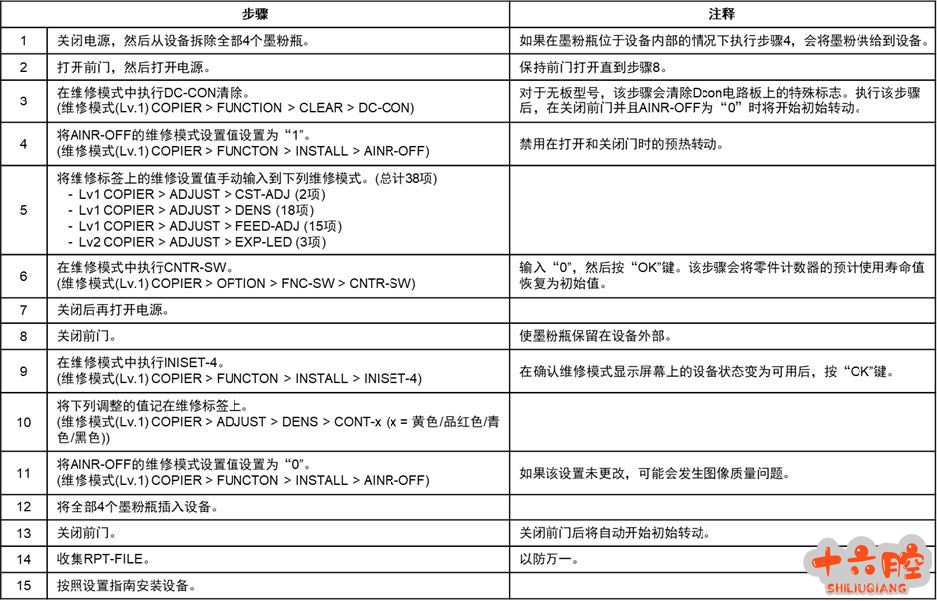
First, the reasons: The DC-CON version is shown as "-" for two reasons: <原因1>: After the host enters the download interface, the operator does not wait for 30 seconds to start the next operation directly. At this time, the host has not recognized all the firmware information stored in the U disk. <原因2>: When a new type of DC control board is installed on the host, if the MN-CON version of the host is earlier, the DC-CON version may not be detected. Second, the countermeasure description: 1.<原因1>The operator needs to wait after the host enters the download interface for the problem that the DC-CON cannot recognize. 30 seconds before starting the [1]Select Version and subsequent operations. 2. For/Regarding<原因2>If you confirm that the DC-CON version detection result is still "-" after waiting for DC-CON 30 seconds, please perform a firmware upgrade to update the MN-CON version. Then perform the upgrade again to update the DC-CON version on the host with the new version MN-CON. Countermeasures: If the above failure occurs in the field, follow the steps in the following list to manually restore DC data to the motherboard.
|
Address of this article:https://073868.com/post/4761.html
Copyright Notice:
For relevant infringements, reports, complaints and suggestions, please send E-mail:weixiuwang68@qq.com
Tags: #C3226 #Firmware upgrade #DC Data







