
|
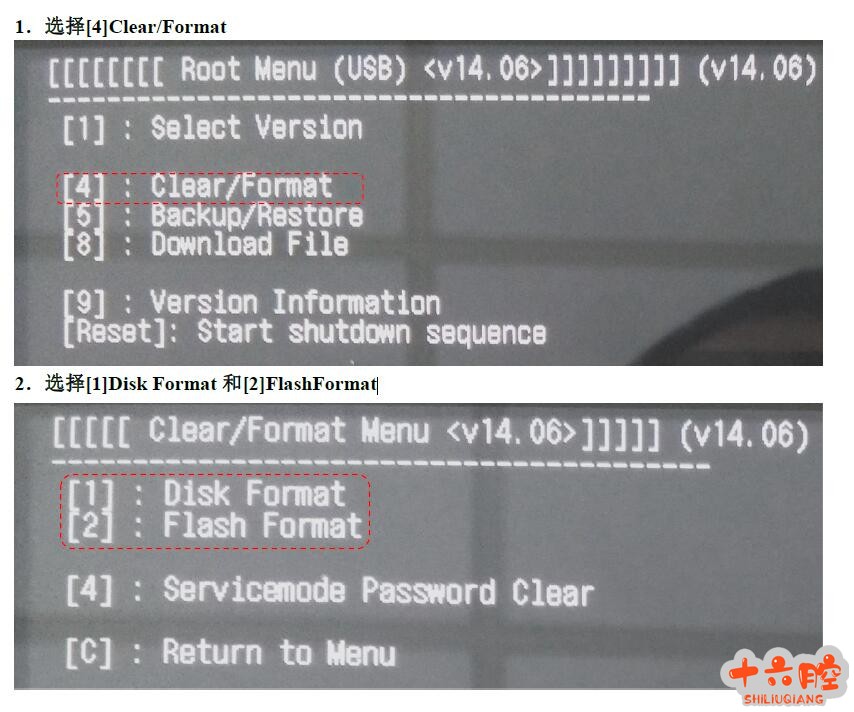
iR-ADV C5535 iR-ADV C5540 iR-ADV C5550 iR-ADV C5560 [Fault description] After booting, the prompt "Checking data, please do not turn off the main power" appears on the display. In this state, the machine cannot enter the normal standby interface for a long time. [Cause of Failure] The device is suspected to have an unknown error during the execution of the boot program. [Maintenance measures] Use a USB flash drive with firmware to connect to the machine, 28 boot into upgrade mode, perform hard disk and FLASH PCB formatting and reinstall the system firmware respectively. <硬盘和FLASH PCB 格式化> 1. Select [4]Clear/Format
|
Address of this article:https://073868.com/post/4732.html
Copyright Notice:
For relevant infringements, reports, complaints and suggestions, please send E-mail:weixiuwang68@qq.com
Tags: #Checking data #5535 #5540 #5550 #5560







