
|
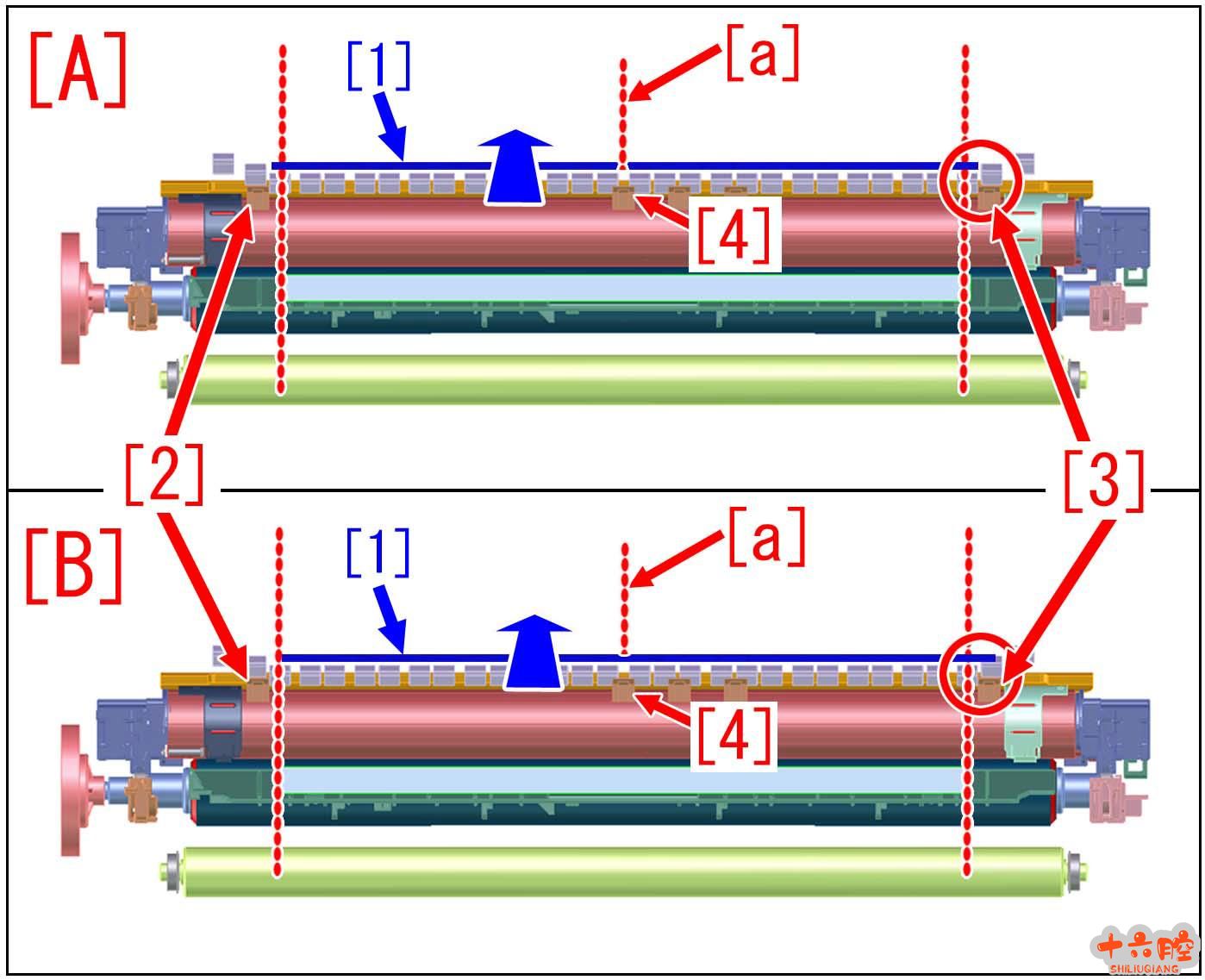
Product Model: iR_ADV C9280 PRO iR_ADV C9270 PRO [Failure Phenomenon] The machine prompts the fault code E004-0214. E004-0214: Fuser Film Surface Temperature Difference Error 4 [Cause of Failure] Normally, the above-mentioned malfunction occurs due to the breakage of the fixing heater unit. In general, the above problem can be solved by replacing the fixing heater unit with a new one. However, when installing the pick-up accessories (Multi-draw paper deck and POD deck lite) on the machine host, if the relevant alignment adjustment items are not correctly implemented, the above failures will also occur. In this way, when the paper [1] is conveyed to the center of the fixing unit [a] by the motor drive, the front thermistor [2], the rear thermistor [3] and the main thermistor [4] in the fixing unit will start to detect the temperature separately. Once a difference in the surface temperature of the fixing film at these three positions is detected, the machine will prompt the error code mentioned earlier. In particular, in the case where the sheet width is sufficient to cover the thermistors at both ends of the fixing unit, such as the use of an oversized sheet (SRA3), the machine is prone to the above-mentioned malfunction. [A] represents a case where the alignment adjustment item is correctly performed and the center position of the sheet [1] completely matches the center position of the fixing unit [a]. Figure [B] shows the situation where the alignment adjustment item is not performed correctly and the rear end thermistor [3] is covered by oversized paper (SRA3).
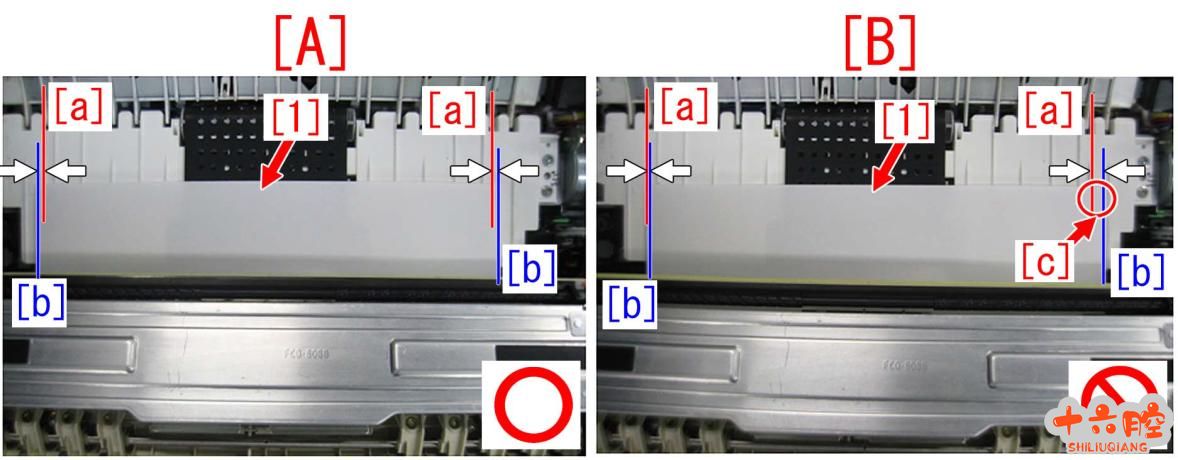
[Maintenance measures] When the above failure occurs, if the hardware of the optional component is installed according to the contents of the installation manual of the multi-draw paper deck and POD deck lite (Multi-draw paper deck and POD deck lite), and the alignment adjustment is correctly executed, the effect that the center position of the paper and the center position of the fixing unit as shown in the following figure can be completely matched. Open the front cover of the machine during paper feeding, and check whether the paper stays in the position of the front fixing paper feeding unit. The photo [A] shows the correct paper stopping position, the rib [a] on the surface of the front fixing paper feeding unit and the paper edge positionThe front-to-back distance between is about 1mm. If the rib [a] on the surface of the front fixing paper feed unit and the paper edge position shown in the photo [B] appearIf the distance between [c] is too large, it is necessary to perform alignment adjustment before and after the paper.
|
Address of this article:https://073868.com/post/4730.html
Copyright Notice:
For relevant infringements, reports, complaints and suggestions, please send E-mail:weixiuwang68@qq.com
Tags: #E004-0214 #C9280 #C9270 #Fusing film #Fixing heater unit







