
|
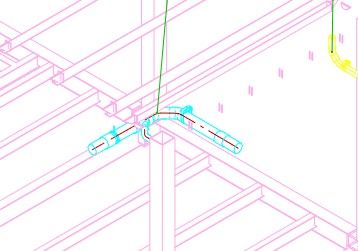
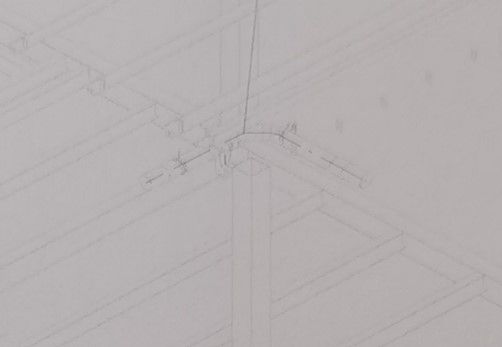
Symptoms: When the customer printed the color PDF drawings in black and white, there was a situation where the original color lines were not black in the printed product.
Partial image of electronic document
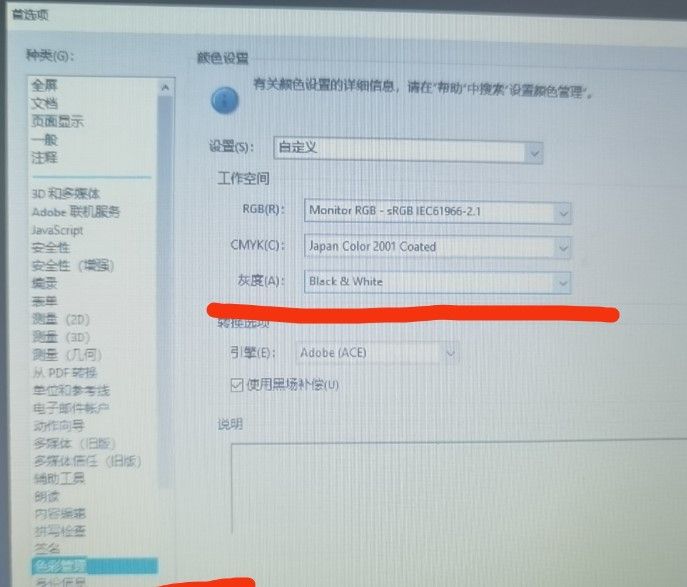
Partial print image Maintenance process: 1. Checking the "Print as bitmap" option on the PDF software printing interface does not improve the printing effect; 2. After adjusting the resolution in the print driver and selecting the "raster graphics" option, there was no improvement in the printing effect; 3. Upgrade the machine firmware version and download and install the latest PCL and PS drivers for testing, with no improvement in printing performance; 4. After adjusting the brightness to -25 and contrast to 50 in the "Detailed Settings" - "Print Quality: Standard" - "Advanced Settings" - "Color Balance" section of the print driver, the print quality improved slightly, but still did not meet the customer's required blackness; 5. Set up in Adobe Acrobat Professional version, select "Black&White" option in "Edit" - "Preferences" - "Color Management" options, and choose "Workspace" - "Grayscale". When printing black and white, the line density of the print will be deepened to meet the customer's needs.
Solution: In the Adobe Acrobat Professional version, select the "Black&White" option from "Workspace" - "Grayscale" in the "Edit" - "Preferences" - "Color Management" options to increase the density of black and white prints. |
Address of this article:https://073868.com/post/3340.html
Copyright Notice:
For relevant infringements, reports, complaints and suggestions, please send E-mail:weixiuwang68@qq.com
Tags: #PDF drawings #c6000 #c2500 #c3500







