Ricoh IM 7000,8000,9000 copy both sides of the ID card onto a piece of paper
Visitor3510
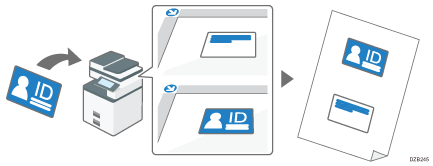
Copy both sides of the ID card onto one piece of paperYou can copy the front and back of small-sized original documents (such as ID cards or business cards) onto one side of a piece of paper (ID card copy).
You can also copy your ID card by pressing "Copy ID Card" on the homepage screen. This section introduces how to make copies on the copying screen.
Cannot specify both ID card photocopying and double-sided photocopying at the same time. If double-sided copying is specified, please press one of the following buttons to cancel the setting.
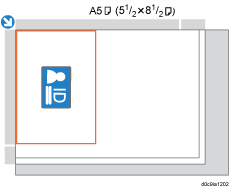
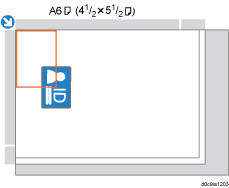
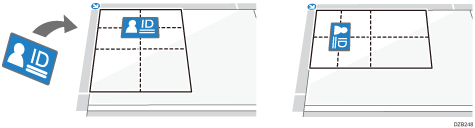
If a copy ratio is specified, some images may not be able to be copied, depending on the placement of the original manuscript. You can place the original manuscript in the upper left corner of the exposure glass to reduce the area that has not been copied.
In A4 (81/2 × 11)
Scan the area when copying at 100%.
In A4 (81/2 × 11)
Scan the area when copying at 200%.
Press[Copy]。
Press the button on the copy screen[Copy of ID card]。
If the key is not displayed, please use[Custom Function: Copy (Standard Mode)]or[Custom Function: Copy (List Mode)]registration[Copy of ID card]。Other (Copy/File Server Features)
Press[Copy of ID card]When,[Paper selection]The settings in will automatically change. To make copies on other paper, please change the settings.
Press[Copy ID card to next step]。
Place the ID card face down on the exposed glass.
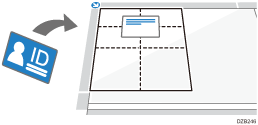
When copying vertically(
)When on paper, please place your ID card horizontally and place it in the center of the scanning area, which is half the size of the paper used for copying. Example: To copy to A4 size (81/2 × 11)
Please place your ID card on A5 (51/2 × 81/2) paper of size
The center of the scanning area of the original manuscript in terms of size.
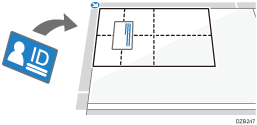
When copying horizontally(
)When on paper, please place your ID card vertically and place it in the center of the scanning area, which is half the size of the paper used for copying. Example: To copy to A4 size (81/2 × 11)
Please place your ID card on A5 (51/2 × 81/2) paper of size
The center of the scanning area of the original manuscript in terms of size.
Press[Start]Scan the front of your ID card.
Place the back of the ID card facing downwards on the exposed glass, and then press[Start]Place the ID card in the same scanning area as the front. When pressed, the back of the ID card will be scanned.
Press[Completed]To make a copy of the next ID card, please press[Continue copying]。
5-804-001 paper feed motor 15-804-002 paper feed motor 25-804-003 paper feed motor 35-804-004 paper feed motor 45-804-005 hand feed paper feed clutch...
Q: One piece of original powder is printed less than 2 kilometers. When the machine is turned on, it is found that there is a lot of powder leakage on the transfer roller. After removing the development and cleaning ID sensor, will the 3103Vsp value 0.07 be too low and a large amount of powder will be added?...
A collection of firmware upgrade methods for all current Ricoh models. Note: No matter which of the following methods is used for firmware upgrade, do not shut down during the upgrade process, this operation will cause damage to the machine hardware. 2. A3 models firmware upgrade SD card production...
Ricoh copier basic principle, imaging principle and copier foundation, color basic principle 1, imaging principle and copier foundation 2, color basic principle 3, machine test sample printing 4, parts manual use training materials 5, dot map use method m...
Symptoms: Keith Deyer cp6303c Machine Printing Times Failure E-02 Causes: 1. Paper table motor problem and poor paper table drive; 2. The height sensor of the paper table and the lower limit sensor of the paper table are not good. 3. Bad motherboard. 4. Harness connection...
Issue: Exporting a profile configuration that contains a large number of workflows and groups does not start the download and cannot be displayed. Occurring condition: A user attempts to export a profile configuration that contains a large number of workflows and groups. Reason: Due to the group and work being processed...
Ricoh IM C320F_P C375_M C320FW Solution to Drum Unit Setting Error after Memory Clear Symptoms When Memory Clear: Clear All (SP:5-801-001) is performed, for example, due to forgetting to log on...