
|
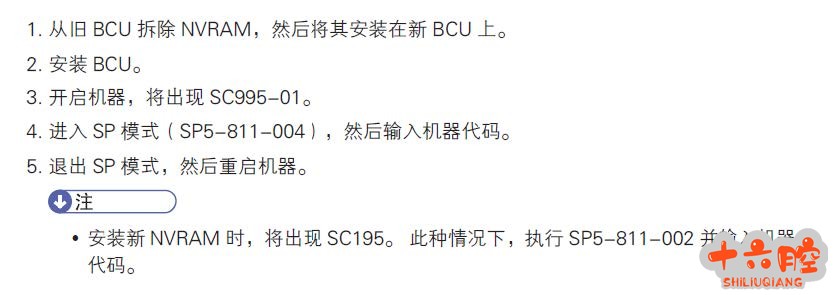
MP6001,MP7001,MP8001,MP9001 Symptoms After replacing the BCU board or replacing the NVRAM on the BCU board, it prompts SC195, and sometimes SC995-01 may also appear The machine serial number is not set correctly. When replacing the BCU or NVRAM on the BCU, follow the steps in the replacement and adjustment section of the maintenance manual:
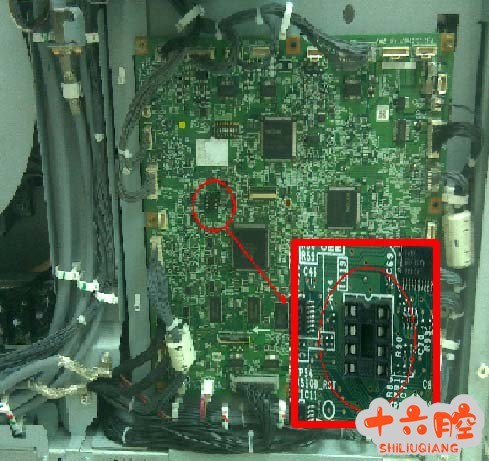
According to the instructions, if the machine serial number does not match, when replacing the BCU or NVRAM on the BCU, you need to enter the corresponding serial number of the machine. Use SP5811 to enter the corresponding body number, and pay attention to the uppercase and lowercase letters when entering the number After entering, the SC195 code still appears when turned on. Upon checking SP5811, it was found that the machine number was not stored in the machine. Reason Poor contact of NVRAM on BCU board, oxidation of NVRAM socket or NVRAM pins on BCU board.
Solution Clean the socket and NVRAM pins with a dry cloth dipped in a small amount of alcohol, reinstall the NVRAM, and ensure that the NVRAM pins are securely plugged in. After the above processing, the fault was resolved. |
Address of this article:https://073868.com/post/3231.html
Copyright Notice:
For relevant infringements, reports, complaints and suggestions, please send E-mail:weixiuwang68@qq.com






