
[User Tools]>System Settings>Administrator Tools>Maintenance Mode Lock>On/Off[/free] To modify the printer position switch, set SP5169 to "1". Please restore after the modification is completed SP1001: Top Alignment SP1002: Horizontal Alignment SP1003: Alignment arch uplift amount SP1105: Fixing temperature adjustment SP1106: Fixing temperature display SP1107: Fixed air running time setting SP1109: Fixing belt width detection SP1902: Cleaning net motor control SP2207: Powder Supply SP2208: Powder Supply Mode SP2506: Cleaning Interval - Continuous Copying SP2602: PTL setting (pre transfer printing) SP2803: Cleaning of charging electrode wire SP2804: Charging electrode wire cleaning settings Print test graphics:
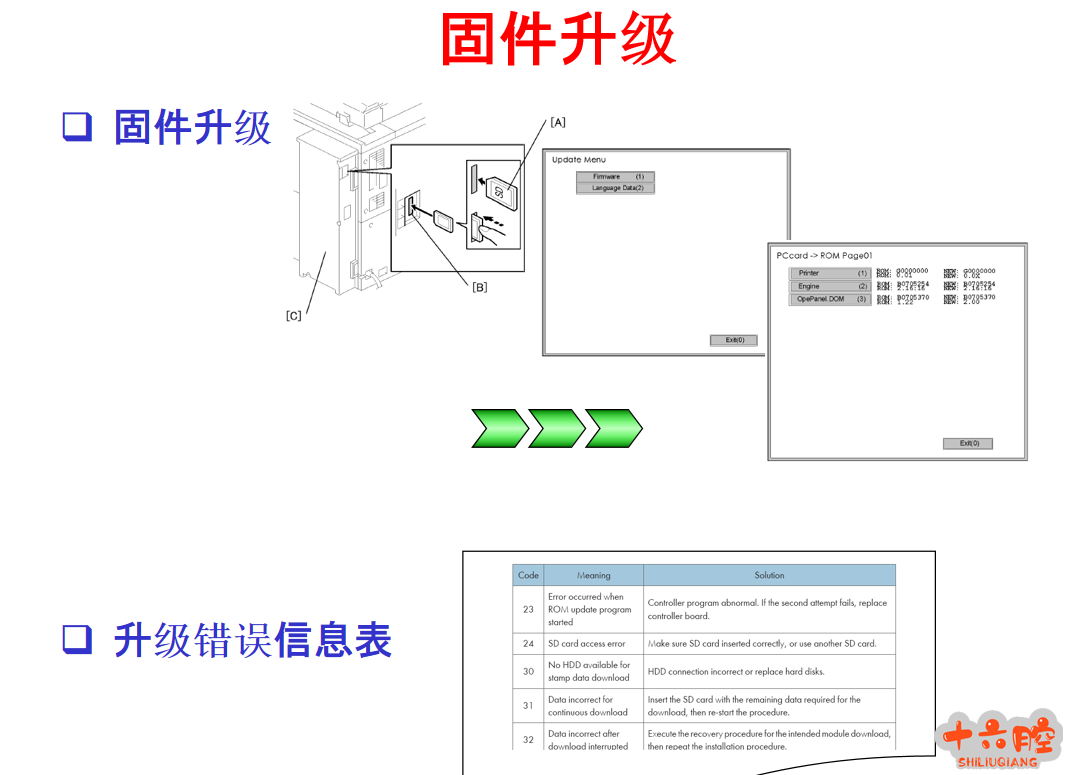
SP2913: Temperature and humidity display SP2986: Color powder refresh setting SP3001: ID Sensor Initialization SP3103: ID sensor output display SP3901: Automatic Process Control Settings SP4013: Scan air freight forwarding SP4301: APS testing SP4305: 8K/16K detection SP5062: Component Replacement Alarm Setting SP5066: Parts replacement alarm display SP5187: PM counting printed in UP SP5501: PM alarm SP5802: Printer air freight transfer SP5803: Input Detection SP5804: Output detection SP5807: Optional Connection Display SP5812: Service Phone Settings SP5832: HDD Format SP5853: Imprint Download (ROM ->HDD) SP5990: SP Printing SP6007: ADF Input Detection SP6008: ADF output detection SP6009: ADF air freight transfer SP6112: Final Processing Tool Input Detection SP6113: Final Processing Tool Output Detection SP6114: Final Processing Machine Air Transfer SP6218: Brochure Final Processing Machine (D434) Input Detection SP6219: Brochure Final Processing Machine (D434) Output Detection SP6220: Booklet Final Processing Machine (D434) Air Freight Transfer SP6309: Folding Unit (D454) Input Detection SP6310: Folding Unit (D454) Output Detection SP6311: Folding unit (D454) air freight conversion SP6600: Stacking Unit (D447) Input Detection SP6601: Stacking Unit (D447) Output Detection SP6605: Stacking Unit (D447) Air Transfer SP7401: SC Total Count SP7403: SC History SP7502: Total Cardboard Count SP7503: Total count of original paper jams SP7504: Cardboard Position (Main Unit and Optional Parts) SP7505: Original Paper Cardboard Detection SP7506: Paper Size Cardboard Counting SP7507: Printer Paper Jam History SP7508: Original Paper Cardboard History SP7621: Display PM count SP7622: Clear PM Count SP7623: Setting Unit PM Target Values SP7624: Parts Replacement Operation Switch SP7807: SC/Cardboard Count Reset User repair mode Operator's adjustment settings Adjustment settings for skilled operators SP5803: Host Input Detection SP6007: ADF Input Detection Firmware upgrade
Download on NVRAM Upload NVRAM data to SD card SP5824 001 (NVRAM Data Upload) Download data from SD card to NVRAM SP5825 001 (NVRAM Data Download) Total memory clearing SP5801: The machine number and brand model will not be cleared Adjustment after the overall clearance Software system restart UP Settings Reset Debug logging Open log recording SP5857-001: Save Debug Log set to "1“ SP5857-002 Save Address Selection 2:HDD ;3:SD SP5858: Set when to save Debug logs SP5859: Set the modules that need to be saved SP5857-009 (Copy HDD to SD Card (Latest 4 MB) |
Address of this article:https://073868.com/post/3185.html
Copyright Notice:
For relevant infringements, reports, complaints and suggestions, please send E-mail:weixiuwang68@qq.com






