
|
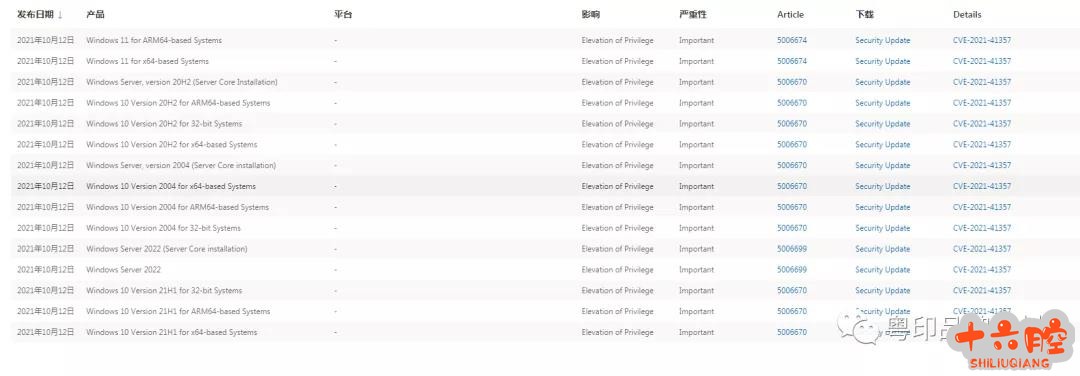
Recently, multiple printer related bugs have emerged in the Windows system, seriously affecting the user experience. Earlier, Microsoft discovered a major vulnerability in the Windows printer stack and subsequent remedial measures, which seems to have caused significant compatibility issues with Windows 11. According to foreign media reports, Microsoft has confirmed three new printer related bugs on Windows 11, which also affect Windows 10. Regarding the recent installation of patch KB5006670 after Windows 10 or the latest Windows 11 system update, due to different operating systems, this security patch may have different patch numbers under different operating systems. Please refer to the following figure for the specific patch numbers corresponding to different operating systems:
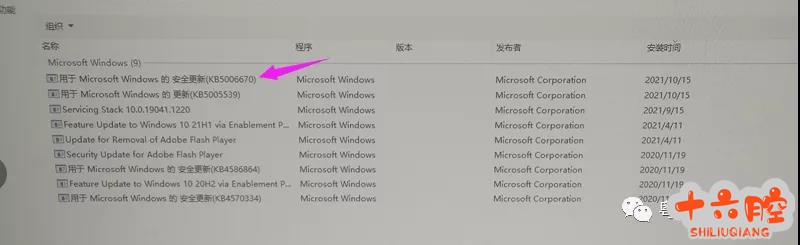
Solution:Option 1: Use Lenovo Quick Fix: Win10 system patch uninstallation tool to uninstall KB5006670 on Win10 system. For uninstallation on other systems, please refer to the code in Figure 1. The download and usage of the tool can be found at the following link: http://iknow.lenovo.com.cn/detail/dc_187119.html Option 2: The manual uninstallation method is as follows: click on the Start menu - Settings - Update and Security - View History of Updates - Uninstall Updates.
|
Address of this article:https://073868.com/post/3121.html
Copyright Notice:
For relevant infringements, reports, complaints and suggestions, please send E-mail:weixiuwang68@qq.com
Tags: #KB5006670 #Windows #Shared network printing #Operating system







