
|
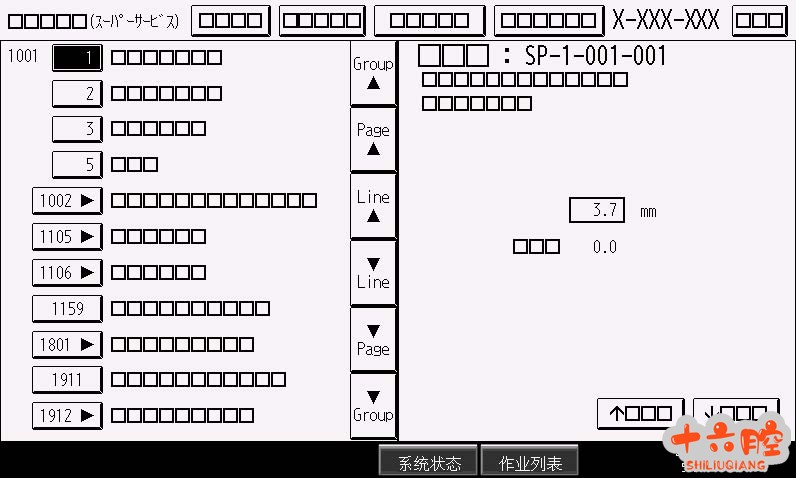
Symptoms There is an MP W2400 engineering machine with normal copy/print output and display on the operation panel. However, when entering maintenance mode, the content of maintenance mode cannot be displayed properly. As shown in the figure below:
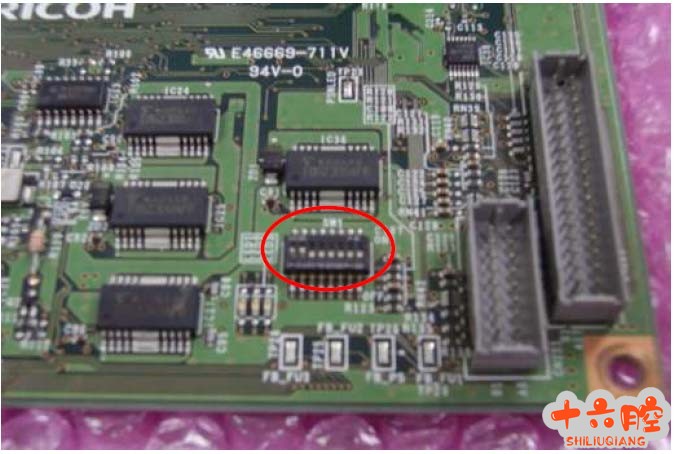
Maintenance process: 1. Inquire with the on-site maintenance engineer and learn that this phenomenon only occurred after replacing the MCU board with a new one. 2. Check the MCU board and find that the dip switch SW1 on the newly installed MCU board is not in the same setting state as the SW1 switch on the replaced MCU board.
3. Set the status of the SW1 switch on the new MCU board to be consistent with the status of the SW1 switch on the MCU on the original machine, and the fault will be eliminated. Attachment: The status of the MCU's SW1 on the original machine: bit1 and bit2 "ON", bit3-bit8 "OFF" The status of the newly ordered MCU's SW1: bit1-bit8 "OFF" |
Address of this article:https://073868.com/post/2972.html
Copyright Notice:
For relevant infringements, reports, complaints and suggestions, please send E-mail:weixiuwang68@qq.com
Tags: #W3600 #W2400 #Maintenance mode #MCU







