
|
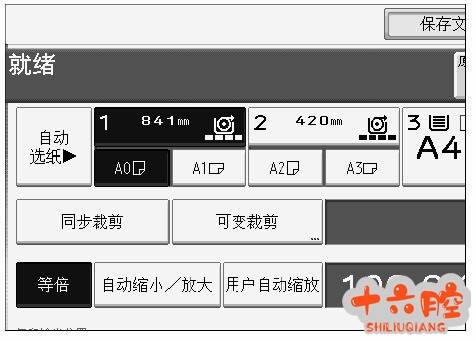
Q: How to make copies of A0, A1, and other sizes of original documents in a unified A0 size? Answer: The Aficio MP W2400 preset cutting function can be used to cut paper in the preset size, regardless of the original size. This allows for copying original documents of different sizes into the same size. The specific operation is as follows: Due to the need to copy to A0, it is necessary to set 1 (or 2 paper rolls) to 841mm. While manually selecting 1 paper roll, select the preset cutting size and direction
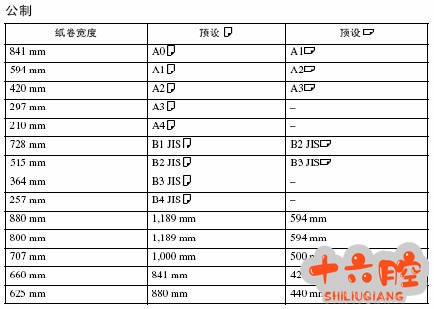
Note: The preset cutting size varies depending on the width of the paper roll, and the paper is cut in the following sizes or standard lengths
|
Address of this article:https://073868.com/post/2951.html
Copyright Notice:
For relevant infringements, reports, complaints and suggestions, please send E-mail:weixiuwang68@qq.com







