
|
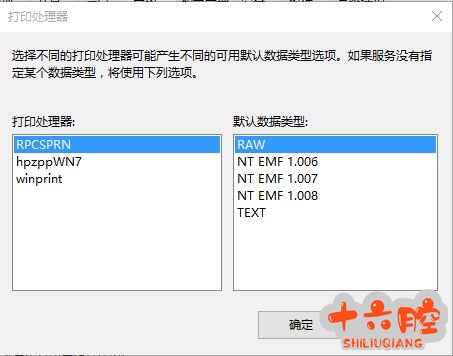
Usage environment: Mpc3003, Install GreenlandV2 standalone version; IBM's CAD software; The printing client is a public machine, win7 os 32bit。 Problem description: 1. MFP is used to print CAD design drawings, and the drawing scale is strictly designed according to standard A3 and A4 sizes. The printed image basically covers the entire paper, leaving only about 2mm of white space on all four sides. 2. Using PCL6 driver for printing, the edge image of the paper is incomplete; Changing the print settings can make the image complete, but the image scale size is incorrect. 3. Using RPCS printing, the image is complete with minimal differences in scale, which is acceptable to the customer. 4. The printing client is a public machine, and the MFP is installed with GreenlandV2. The customer requests that a pop-up prompt prompt for username and password be entered every time printing occurs; RPCS does not support custom pop ups, and PCL6 printed images do not meet customer requirements. Solution: 1. Customize PCL6 driver spring frame. 2. Install both PCL6 driver and RPCS driver simultaneously. 3. Control Panel - Printer Properties - Advanced - Print Processor
4. After the modification is completed, you can use both PCL6 pop ups and RPCS narrow border printing. |
Address of this article:https://073868.com/post/2873.html
Copyright Notice:
For relevant infringements, reports, complaints and suggestions, please send E-mail:weixiuwang68@qq.com






