
Fault condition
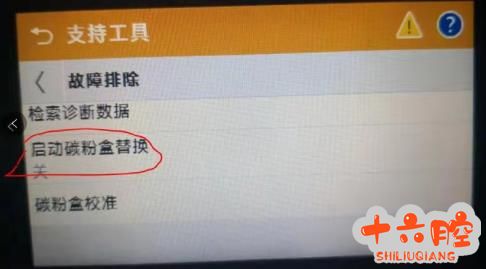
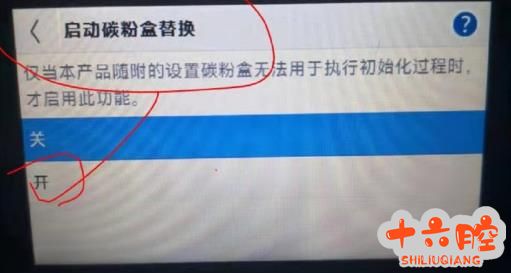
Solution: 1) Turn off the printer, and then turn it on. 2) If the error persists, check whether the ink cartridge used is the original ink cartridge. 3) Operate the disassembly, then reinstall the power box, check whether the metal contact points of the ink cartridge are contaminated, and clean it. 4) If it is a random ink cartridge failure and cannot be initialized, please apply for the consumable DOA corresponding to the failure.Use the 993X Trade cartridge again to complete the initialization. The 993X Trade cartridge performs initialization. For PWA machines with FutureSmart firmware, we have added an option to "start toner cartridge replacement". We can enable the following functions through the following menu, but this function can only be started when the Setup cartridge cannot be used to perform the initialization process. Support Tools> Troubleshooting> Start Toner Cartridge Replacement> Then open, so that you can use the 993X Trade Cartridge to perform initialization
|
Address of this article:https://073868.com/post/2836.html
Copyright Notice:
For relevant infringements, reports, complaints and suggestions, please send E-mail:weixiuwang68@qq.com
Tags: #P774 #P779 #P77440 #reservoir chip







