
|
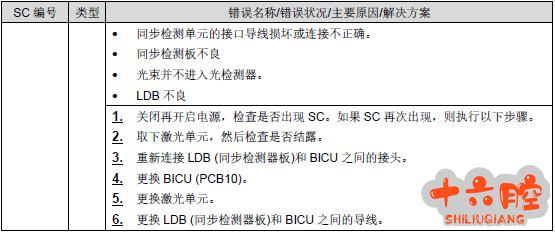
Symptoms A code SC220-01 fault occurs when the machine is turned on. Black laser problem
Maintenance process On-site maintenance measures: 1) Disassemble and assemble the machine to check the fault-related laser unit and the BICU board connection harness and wire connector. Clean the mirrors, multi-prism and lenses inside the laser unit. Reinstall and start the machine to detect faults that cannot be ruled out. 2) Replace the BICU board of the machine, the fault still exists. 3) Replace the laser unit of the machine and troubleshoot. (Note: Remove the laser unit to check the internal lens position and the connection of the synchronous detector board, and then assemble the same fault, only replace the laser unit to solve the fault) Solution Replace the laser unit of the machine, and the machine test is normal. |
Address of this article:https://073868.com/post/282.html
Copyright Notice:
For relevant infringements, reports, complaints and suggestions, please send E-mail:weixiuwang68@qq.com







