
|
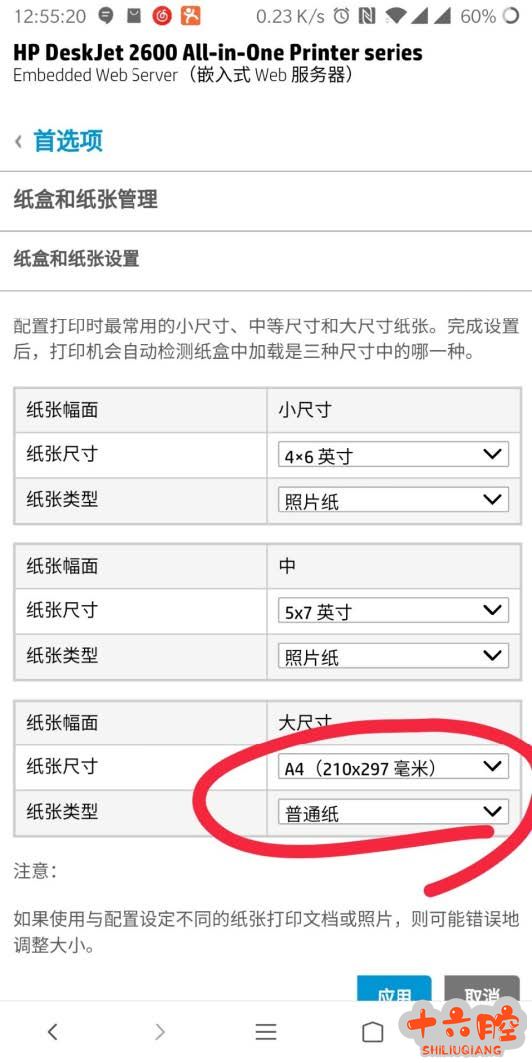
Fault Description: After DJ 2622 to replace the motherboard, it made an error E2 in the copy. Resolution process: The machine prints normally, only when copying, it reports the error E2, and the motherboard is new. There is basically no possibility on the hardware side. Check the machine settings through HP Smart and find that the default large paper size is "Letter" in the machine's paper settings ". Change it to A4 size and the machine copies normally.
Share summary: 1. HP Smart has very intuitive and powerful functions. Making full use of it can help us better confirm the problem of machine failure. 2. After the machine is repaired, a comprehensive functional test must be carried out, especially after the motherboard is replaced, the machine should confirm the functional items separately. If the function item is not determined well, our first step is to align the corresponding function settings. The inattention to this detail will bring great trouble to the successor when taking the machine. |
Address of this article:https://073868.com/post/2735.html
Copyright Notice:
For relevant infringements, reports, complaints and suggestions, please send E-mail:weixiuwang68@qq.com
Tags: #DJ2622 #2622 #E2 #Smart #HP Inkjet Printer







