
|
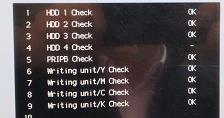
Fault Description: After the device is turned on, the screen displays a prompt as shown in the picture.
Cause of the failure: SSD is damaged. Solution: 1. Replace the SSD with a new one. 2. Turn on the main power supply, press and hold the "Utility/Counter" button to turn on the auxiliary power supply and enter maintenance modeWrite firmware. After the firmware is written, restart the device. Enter the maintenance to check the firmware version. If controller P fails to upgrade, it will prompt C-D060 Perform I/O check 99-97 99-98 99-99, shut down and restart the device, and perform firmware upgrade again. Precautions:
|
Address of this article:https://073868.com/post/2533.html
Copyright Notice:
For relevant infringements, reports, complaints and suggestions, please send E-mail:weixiuwang68@qq.com
Tags: #C3080 #Boot #Black screen #Ke Mei







