
|
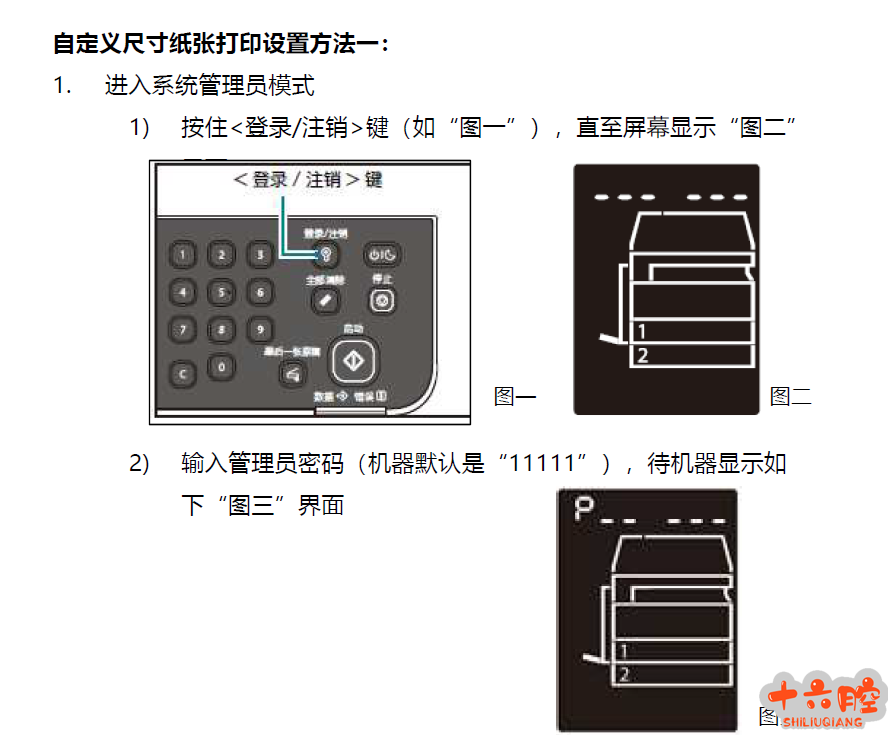
Content Custom size paper print setup steps: 1. Create a custom-sized document on the application on the user's computer. 2. Set a user-defined paper size on the printer There are two setting methods. One is set directly on the printer; the other is through the "Apeos_2150_2350 Printer Setup Utility" 3. Set a custom paper size in the Longjing-X print driver of the user's computer and choose to feed paper from the bypass tray and print this document. Take the custom size (148 x 261mm) as an example
Link: https://pan.baidu.com/s/1AgeoqWEKNa1_VpjHkMphpw Extraction Code: t3ow |
Address of this article:https://073868.com/post/2401.html
Copyright Notice:
For relevant infringements, reports, complaints and suggestions, please send E-mail:weixiuwang68@qq.com
Tags: #2350 #2150 #Custom size #Paper #Print settings







