
|
Canon iR2520i/2525/2530 appears E000002 error code reason: Insufficient temperature rise of the fixing component The main thermistor detected a temperature below 115 degrees Celsius for 400ms, and after 1.3 seconds, it detected a temperature of 100 degrees Celsius. The main thermistor detected a temperature below 150 degrees Celsius for 400ms and 140 degrees Celsius after 1.3 seconds. The solution is as follows:
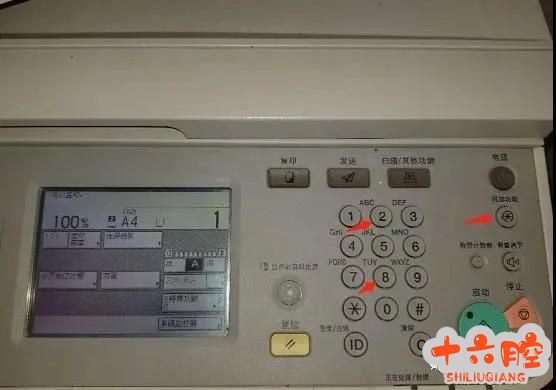
1. Press the "Additional Functions" button, then the number "2" and "8" buttons. (As shown in the picture above) 2. Press the 'Additional Features' button again, and then release it. At this point, the Canon copier will prompt that it is currently in "service mode" (* 28 *, speed should be fast, if not, just try a few more times) Press(right arrow)Find the following words and press' OK ', then press' OK' to find the next one: COPIER-UNCION-CLEAR>ENGIN>ERRCLR, OK, then turn off and turn on the power again. If the machine cannot be restored to normal, the following hardware needs to be checked and replaced: (1) Check the connection of plugs, such as thermistor plugs and AC plugs. (2) Replace the fixing main thermistor component (fixing film component). (3) Replace the fixing component. (4) Replace the DC controller circuit board PCB4. |
Address of this article:https://073868.com/post/2308.html
Copyright Notice:
For relevant infringements, reports, complaints and suggestions, please send E-mail:weixiuwang68@qq.com
Tags: #2520i #2525 #2530 #E000002 #Fixing Assembly







