
Xerox DP CM315z, 318z firmware upgrade program+Chinese repair manual
Fault phenomenon:
Printing dirt caused by transfer belt components
Solution:
The cause of the malfunction is that the waste powder is concentrated in the transfer belt scraper and cannot be eliminated, resulting in the waste powder not being scraped clean
1. Upgrade the firmware. It is recommended to upgrade to the latest firmware even if the machine is not faulty
CP318:180418_dpcp315_stdap
CM318:180605_dpcm315_stdap
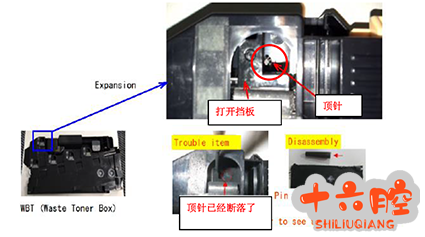
2. According to the following diagram, check whether the ejector pin in the waste powder box is broken (opening the IBT scraper waste powder channel), and replace it if necessary
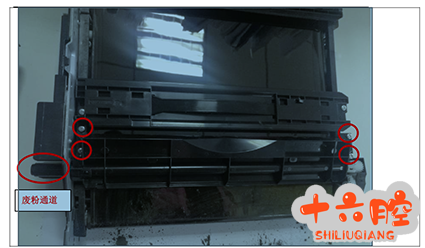
3. Remove the transfer belt assembly, remove the four screws, remove the transfer belt scraper, remove the accumulated waste powder, and check if the waste powder channel is blocked
Link: https://pan.baidu.com/s/1c2yxc0GSk3b6WlggIpOyxg
Tags: #315z #318z #Firmware #waste powder #Transfer Belt Assembly







