
|
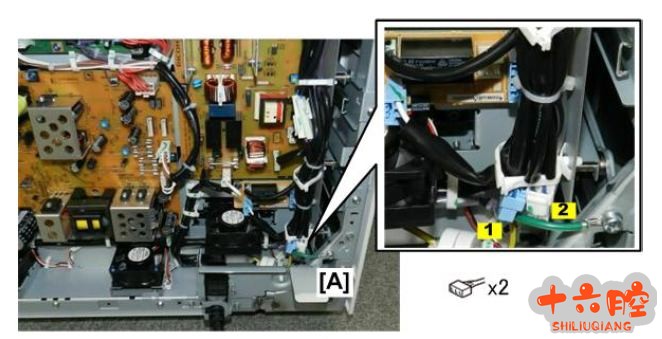
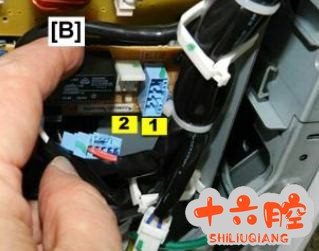
Phenomenon: Overnight paper copy curl is relatively large, paper jam rate is high, accompanied by SC440 code. At this time, as long as a pack of new paper machine can be used normally Maintenance process: The above phenomenon is obviously due to the problem caused by damp paper. Since this series of models has been pre-installed with 2 paper tray heaters, the following space will explain how to correctly turn on this function (different from the instructions in the maintenance manual) 1. Open the lower cover and you can see the AC power supply board at the lower right and the small board DHB at the lower right (because this is a 220V AC power supply board. Before performing these operations, unplug the power supply line and press the power switch to discharge for 3 seconds.) 2. As shown in the figure, loosen the No.1 plug and insert it into the blue socket 1 in DHB (this is the power cord of the two heaters)
3. The CN930 socket on the DHB board has 2 states (different from the maintenance manual here) Plug in: As long as the screen is lit, the heater will be powered off and will not work (that is, the heater will work when it is turned off or energy saving) Not inserted: the heater continues to heat (the paper tray will have a slight temperature)
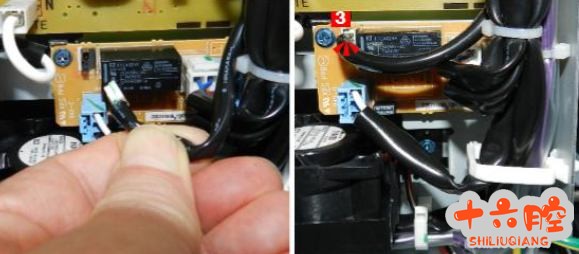
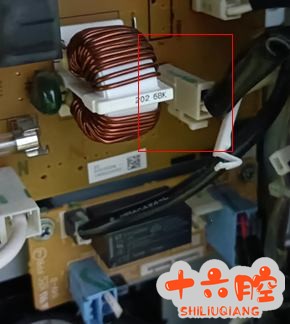
4. As shown in the figure below, the power cord of the DHB board needs to be connected to the AC power board, and the plug in the red box in the figure should be plugged in. In this way, the heater will work according to the state of CN930 (actually affecting the on-off of the black relay in the figure) (this step is not included in the maintenance manual)
5. At this time, the installation of the heater has been completed, and the surface of the heater will obviously feel the temperature about 5 minutes after the back cover is closed and energized.
|
Address of this article:https://073868.com/post/1353.html
Copyright Notice:
For relevant infringements, reports, complaints and suggestions, please send E-mail:weixiuwang68@qq.com
Tags: #sc440 #6503 #Cardboard box #Heating







