
|
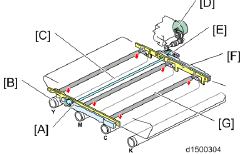
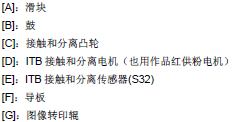
Symptoms A code SC442-00 failure occurs when the machine starts a color copy. Reason 1 The installation position of the ITB unit of the machine is not good. 2. The machine’s connection to the ITB driver has failed. 3. The machine’s ITB contact and release sensors are malfunctioning. 4 The ITB contact and release motor of the machine is poor. 5 The driving mechanism unit of the machine has a large load. Maintenance process On-site maintenance measures: 1) Check the ITB related connection harness on the machine, clean the ITB contact and release sensor, clean the drive gear, and reinstall the ITB unit,. The machine has been started, but the fault cannot be resolved. 2) Replace the drive motor unit and sensor of the machine. The fault still exists. 3) Replace the ITB unit of the machine and troubleshoot. (Note: Remove the ITB unit to check that the transfer roller mechanism in the push ITB does not rotate flexibly. Remove the push transfer roller mechanism to clean and correct the position, and re-test the machine to eliminate the fault code)
A The load generated by the sliding block on both sides is faulty. Solution Remove and install the transfer roller mechanism on the ITB unit to clean and correct the position. The machine is normal. |
Address of this article:https://073868.com/post/1352.html
Copyright Notice:
For relevant infringements, reports, complaints and suggestions, please send E-mail:weixiuwang68@qq.com
Tags: #SC442 #C2000 #C3500 #ITB Unit #Transfer printing






