
|
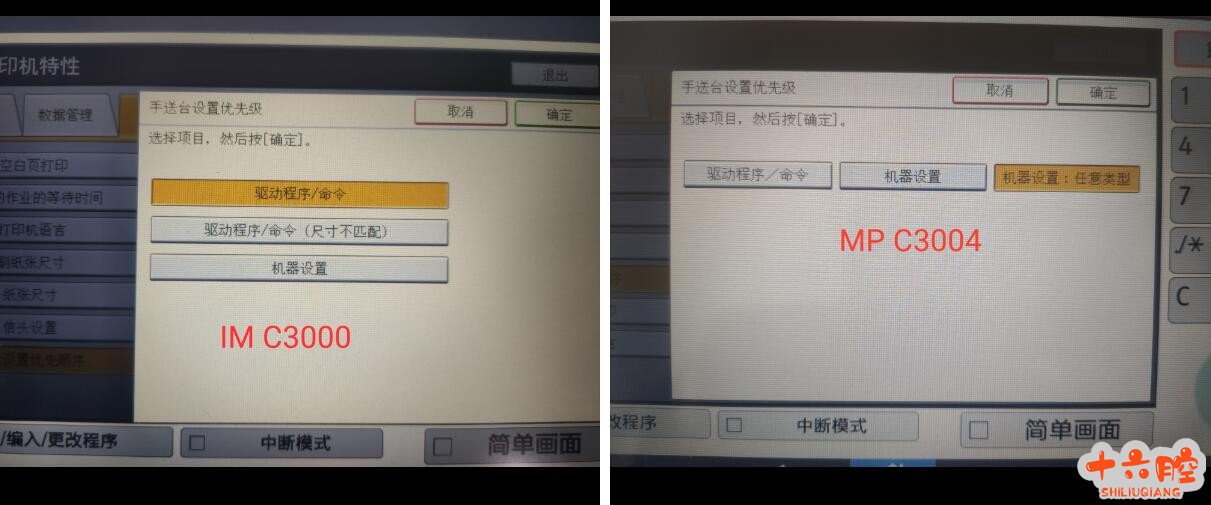
Solution to the problem of not being able to print the cover on both sides of the Ricoh IMC model manual delivery table IM_C2000_C2500_C3000_C3500_C4500_C6000/M.C2001 The IMC3000 model is troubled by the issue of not being able to print double-sided covers. Upgrading the firmware and replacing the driver version have not been able to solve the problem. However, during the process, it was discovered that if the cover paper is placed in a cardboard box, double-sided printing can be performed normally. Therefore, the problem is obviously related to the hand delivery platform. Finally, when comparing the settings menus of the IMC3000 and MPC3004 related to the cover and hand feeding table, it was found that there were differences in the "Hand Feeding Table Setting Priority" option under the "Paper Tray Setting Priority Order" in the "Printer Features" and "System" sections, as shown in the figure. The default setting of this option in the IMC series machine is the "Driver/Command (size mismatch)" that is different from the previous model. After trying to set it to "Driver/Command" (in fact, it can also be set to "Machine Settings"), the cover can be printed on both sides normally from the hand feeding table. At this point, the problem is finally solved, and miraculously, even if this option is set back to "The driver/command (size mismatch) fault no longer occurs.
|
Address of this article:https://073868.com/post/1248.html
Copyright Notice:
For relevant infringements, reports, complaints and suggestions, please send E-mail:weixiuwang68@qq.com
Tags: #Hand delivery #Double-sided #2000 #6000 #3500







