
|
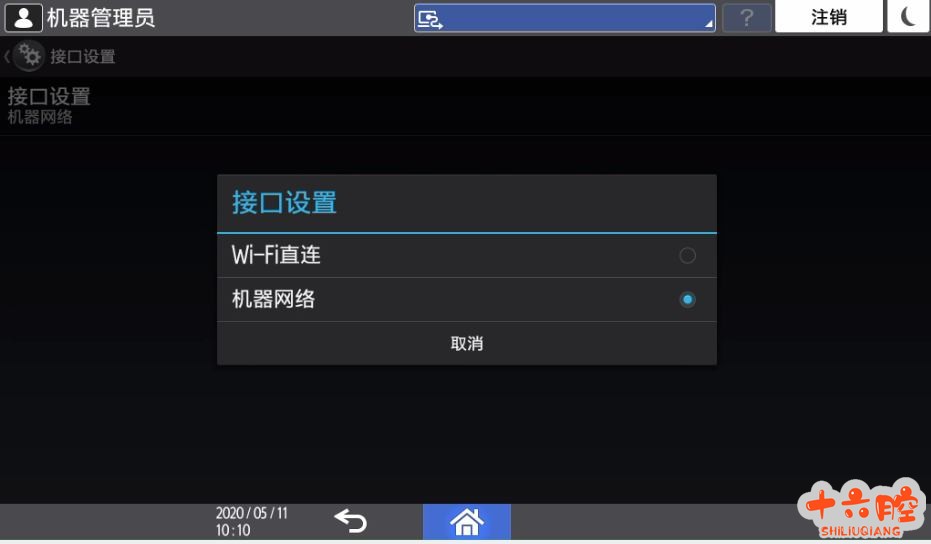
Symptoms IMC6000 cannot open remote panel operation. The remote panel operation function has been turned on and the IP address has been set correctly. It can also log in to WIM (built-in web page of the machine), but when the remote panel operation function is turned on, it shows a connection failure Reason 1. Problems with computer browsers, firewalls, and antivirus software; 2. Firmware version issue; 3. Operation screen issues; 4. Setting issues in user tools; Measures 1. Change the browser, turn off the firewall and antivirus software, but the problem persists; 2. Upgrade the firmware to the latest version, but the fault persists; 3. Solve the problem of replacing screen components; 4. When switching back to the original screen component, it was found that the interface settings in the screen features were set to Wi Fi direct connection and machine network, and the fault was resolved.
Solution 1. Go to User Tools - Screen Features - Interface Settings - Change to Machine Network to solve the problem. |
Address of this article:https://073868.com/post/1193.html
Copyright Notice:
For relevant infringements, reports, complaints and suggestions, please send E-mail:weixiuwang68@qq.com
Tags: #Machine Network #6000 #Remote #Panel






