
|
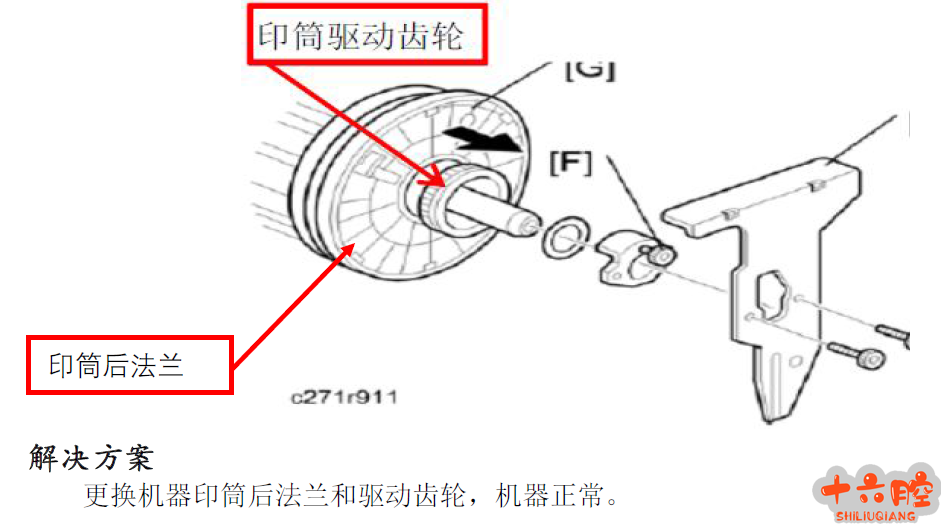
Symptoms A E-06 failure occurs after the machine starts the printing cylinder to rotate one circle. Reason 1) The motherboard MPU of the machine is bad. 2) Defect in the machine’s main motor. 3) Malfunction of the in-situ sensor on the machine. 4) Defect in the drive gear of the machine’s impression cylinder. 5) the machine main drive transmission part of the bad. 6) poor machine connection harness. Maintenance process On-site maintenance measures: 1) Disassemble and inspect the MPU connection harness and printing cylinder part of the mainboard of the machine. Clean the machine cylinder position. Reinstall back to the machine. The machine has been started, but the fault cannot be resolved. 2) Replace the machine main motor and in-situ sensor. The fault still exists. 3) Replace the machine’s MPU motherboard. The fault still exists. 4) Replace the machine cylinder unit. Troubleshooting. (Note: After checking the position in the printing process caused by the serious wear of the printing cylinder drive gear and the looseness of the rear flange, the trigger lever on the printing cylinder triggers the abnormal in-situ sensor and the code E-06. Replace the machine printing cylinder drive gear and the rear flange to solve the fault).
|
Address of this article:https://073868.com/post/1139.html
Copyright Notice:
For relevant infringements, reports, complaints and suggestions, please send E-mail:weixiuwang68@qq.com
Tags: #E-06 #3344c #3344 #Printing Cylinder Unit







