
|
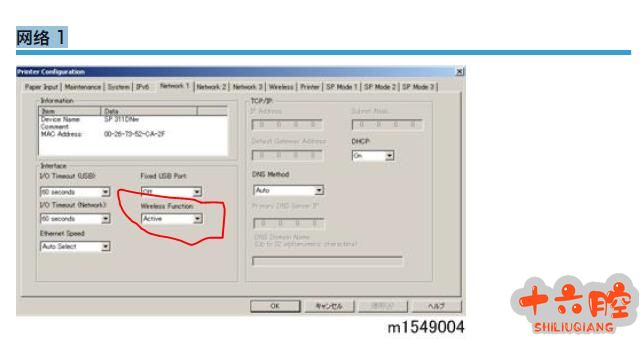
Ricoh SP310DNwV cannot set WIFI wireless Model: SP310DNwV/313DNwV Symptoms SP31DNwV cannot set WIFI Reason 1. Machine PNP settings are incorrect 2. The firmware version of the machine is incorrect 3. Incorrect network settings Maintenance process The machine has undergone memory clearing and firmware upgrade, with the current firmware version being 1.12. The machine number and PNP code have been rewritten, but wireless cannot be set up. Upon entering SOM to check the machine settings, it was found that due to memory clearing, the wireless function in machine network 1 settings was set to pause. After changing the setting to active and restarting the machine, WIFI can be set up. The red circle in the picture represents the wireless function settings
Solution Launch SOM Utility ->Click [User Tools] ->Click [Printer Configuration] ->Click [Network1] ->Set to [Active] in [Wireless Function] |
Address of this article:https://073868.com/post/1107.html
Copyright Notice:
For relevant infringements, reports, complaints and suggestions, please send E-mail:weixiuwang68@qq.com
Tags: #WIFI #Wireless #31DNwV #313DNwV #Memory Clear







