
|
Symptoms: After the MP3055SP machine is turned off, the LED lights on the screen cannot be completely turned off for half an hour Reason:
Maintenance process: 1. According to the fault display, replace the power board and control board in sequence, but the machine still has the fault; 2. Replace the SOP screen and troubleshoot. The locked fault is due to a faulty SOP screen. Try resetting the screen to its factory settings and restart the machine to troubleshoot. The test run is normal, as shown in the following figure:
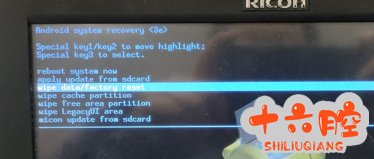
According to the Cheeta-G2 firmware upgrade operation method, press the physical buttons 1 and 3 on the left side of the screen to turn on the machine. The sun symbol will appear, as shown in Figure 1. Release the button and press the 1 and 2 keys for about 5 seconds to enter the system interface on the screen. At this time, the 1 and 2 keys move up and down, select "wipe data/factory rest" (restore factory settings), as shown in the figure, press the 3 key to confirm, and restart the machine. Troubleshooting, the test run is normal. Solution: Restore the factory settings of the screen, troubleshoot after restarting the machine, and the test run is normal. |
Address of this article:https://073868.com/post/1098.html
Copyright Notice:
For relevant infringements, reports, complaints and suggestions, please send E-mail:weixiuwang68@qq.com
Tags: #3055 #SOP screen #Power board #Control panel






