
|
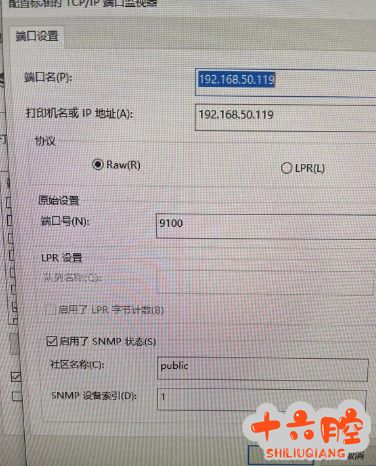
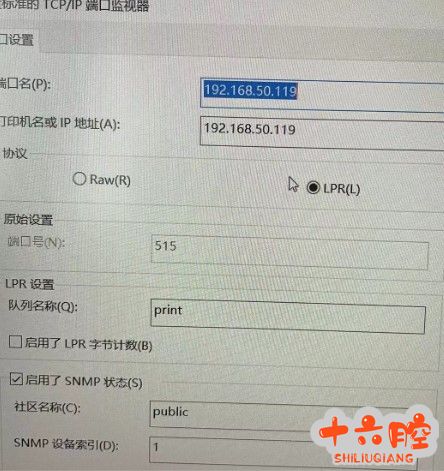
Symptoms A Ricoh IMC will always output garbled printed sheets after normal text printing during network printing; Possible causes: Drive malfunction/machine malfunction/network malfunction/setup issues Maintenance process 1. Upon on-site inspection of the malfunction, the machine turned on normally and the printed document output was normal. However, after normal document output, several garbled texts would always appear (see the fault sample for details); 2. Due to the client's continuous use of Office Word for document output, we conducted tests using other application software (Excel/PDF/PPT, etc.) and the issue persisted; 3. During on-site inspection, we found that the customer was using PCL 6 printer driver. After replacing the PCL 6 Driver for Universal Print/PCL6V4 Driver for Universal Print/PS3 printer driver, we conducted tests but were unable to solve the problem; 4. Suspect that there may be a malfunction in the customer's on-site network, conduct self-organizing network testing, and troubleshoot the issue; 5. The customer's identification indicates that the router cannot be replaced to eliminate the current network problem. There are other printers in the same local area network that are outputting normally. We hope that we can thoroughly solve the problem; 6. Upon checking the network settings of other printers, it was found that they were not using the RAW port for printing and were using the LPR printing method. The issue was resolved by changing the printer port from RAW9100 to LPR515 on site (as shown in the figure);
Solution Troubleshooting after changing the printer port; |
Address of this article:https://073868.com/post/1071.html
Copyright Notice:
For relevant infringements, reports, complaints and suggestions, please send E-mail:weixiuwang68@qq.com
Tags: #Garbled text #C2500 #C2000 #PCL 6 print driver #LPR515







