
|
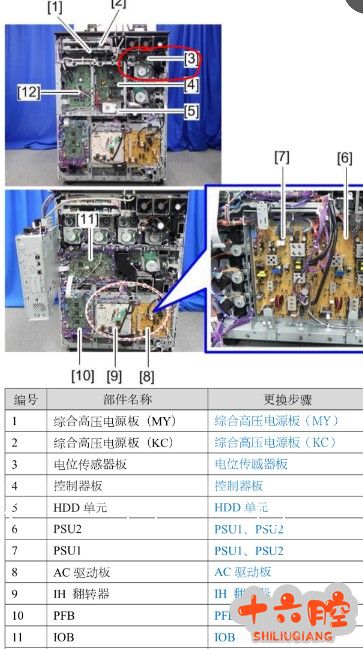
Symptoms 1. One Ricoh IMC8000 printer with color cast; Possible causes: ITB defect/High voltage board defect/PCDU/BICU defect/Drum potential sensor/Potential sensor board Maintenance process 1. Upon on-site inspection of the malfunction, it was found that the machine would experience color deviation issues during both copying and printing, as shown in the faulty sample; 2. By checking that the gamma and Vt values of each color display normally; 3. Execute SP3-011 and SP2-111 expected color calibration, the line position is executed normally, the automatic process control execution is incorrect, and the result is displayed as "45455445"; 4. Replace the various color PCDU units for testing, but it is invalid. Replacing the ITB test is invalid. Replace two high-voltage boards for testing, ineffective; 5. Replace the controller board and BICU board for testing, and the fault persists; 6. Check the output voltage of the drum potential sensor, which is currently displayed as "Black-700/Color510". The value is severely abnormal, and the fault persists even after replacing the drum potential sensor; 7. Through P TO P inspection, it was found that the drum potential sensor is connected to the potential sensor board for output. After replacing the board, SP3-070 can perform adjustments, and the value returns to (black 680/color 107). The machine's printing output is normal;
Solution Replace the potential sensor board to solve the problem; |
Address of this article:https://073868.com/post/1055.html
Copyright Notice:
For relevant infringements, reports, complaints and suggestions, please send E-mail:weixiuwang68@qq.com
Tags: #C8000 #Printing color deviation #C6500 #High voltage board malfunction #drum potential sensor







