
|
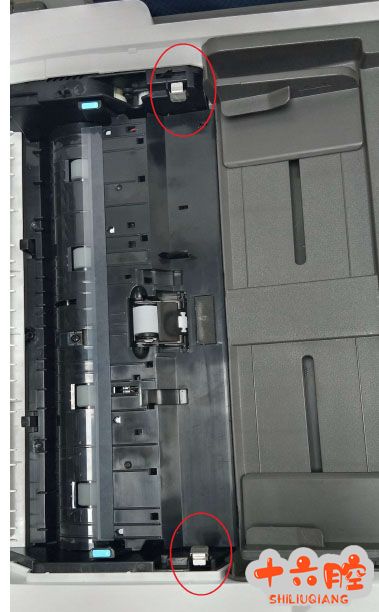
When copying on Ricoh MC2000 machine, the paper feeder roller idles and makes abnormal noise, causing paper jam. Diagnostic process 1) Clean the paper roller and separation roller/pad of the document feeder, but the malfunction persists. 2) Check and clean the original paper feeding sensor and original setting/reversing sensor, the fault still persists. 3) Check the feed drive motor of the document feeder and no abnormalities were found. 4) Due to a slight abnormal noise during the malfunction, similar to the slipping and idling sound of the paper feeding drive part of the paper feeder, the left cover of the paper feeder was pressed with force and copied for testing. The fault was resolved. 5) Upon inspection of the left cover of the document feeder, it was found that it cannot be fully closed by natural closure alone, but the machine does not prompt to open the left cover. After adjusting the locking metal spring on the left cover of the document feeder (circled in red in the figure below), the left cover was tightly closed and the document feeder was copying normally.
Solution Adjust the locking metal spring of the left cover of the document feeder and solve the problem. |
Address of this article:https://073868.com/post/1009.html
Copyright Notice:
For relevant infringements, reports, complaints and suggestions, please send E-mail:weixiuwang68@qq.com
Tags: #C2000 #Paper feeder card #Separation roller #G3020C







