| Machine model: | IM C2010/C2510,IM C3010/C3510 GS4030c,IM C4510/C6010 GS4045c/GS4160c |
|---|
|
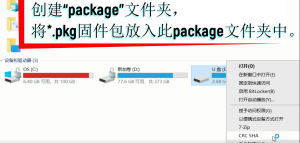
Steps IMC2010-IMC6010 Upgrading Firmware Package on Smart Screen Using U Disk U disk upgrade method and IM2500-IM6000 and IMC2000-IMC6000 common Note: If there is a Japanese prompt during the upgrade process, it is forbidden to interrupt the power supply during the upgrade process. Do not turn it off. Just wait patiently for the upgrade to end.
IMC2010-IMC6010 the use of U disk in the smart screen to upgrade the firmware package steps... Link: https://pan.baidu.com/s/1OUw2pABwyMY-RJgUR15DRw Extraction code: ll13 |
Address of this article:https://073868.com/post/5305.html
Copyright Notice:
For relevant infringements, reports, complaints and suggestions, please send E-mail:weixiuwang68@qq.com
Tags: #C6010 #C2010 #Smart screen #Upgrade firmware #USB flash drive