
|
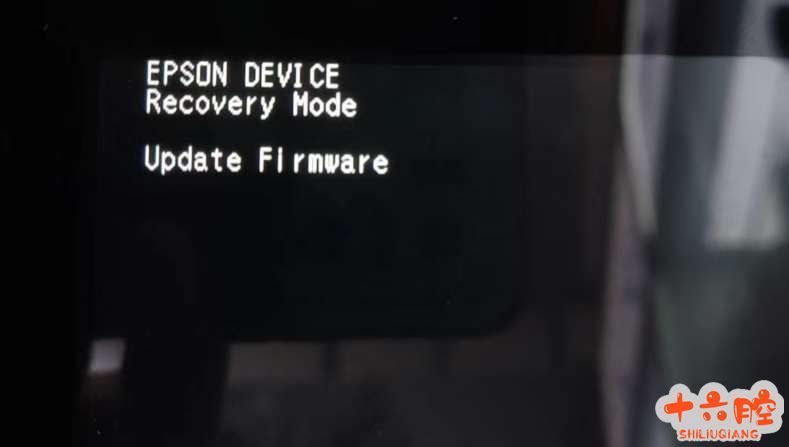
Applicable models: L8168/L8188 Due to the lack of firmware programs on the new motherboard, the printer will directly enter "Recover Mode" after replacing the motherboard. At this time, it is not possible to initialize the new motherboard by adjusting the program. The firmware program needs to be flashed onto the new motherboard first, and then the initialization operation can be performed. The specific operation method is as follows: Install a new motherboard and connect the printer power cord. The printer will automatically turn on and the screen will display "Recover Mode" (as shown below)
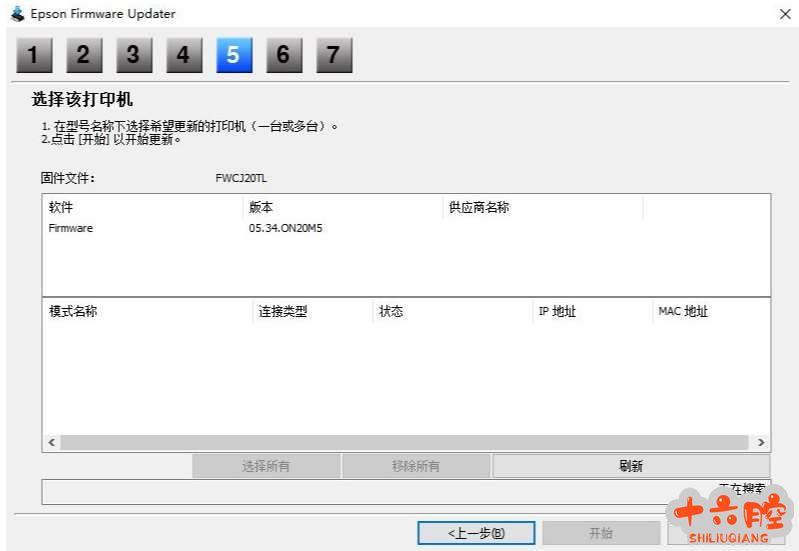
1. Connect the PC to the printer using a USB cable. (Note that desktop computers must use the USB port at the back of the host) Note: The downloaded firmware program is a compressed file (. zip), which needs to be decompressed into an executable file (. exe file) before running (as shown in the figure below). Do not double-click the compressed file directly to run the firmware upgrade program, otherwise it is easy to not find the printer port. 2. Double click to run the decompressed firmware program "**********. exe", and then follow the prompts to operate. When executing step 5 of the firmware upgrade program, an "unknown" printer will be found at the red box position in the following image.
If no printer is found in step 5, please try replacing the USB cable, unplugging the USB cable again, or check if you forgot to decompress the firmware program files in advance. 4. Check the "Unknown" printer and click "Start" to upgrade the firmware Attention: During the firmware upgrade process, the printer LCD screen will remain in the "Recover Mode" interface without any prompts. When the progress bar reaches 100%, you need to patiently wait for 5-10 minutes, and then the printer will automatically shut down. Do not unplug the printer power cable, USB data cable, or close the firmware upgrade program during this process. Otherwise, firmware upgrade failure will cause the motherboard to experience a power failure upon startup. 5. Press the power button on the panel to power on, and then use the adjustment program to initialize the new motherboard. Link: https://pan.baidu.com/s/1oTCCZ8UUqNsqQa-b1sr6YA Extraction code: u2ia |
Address of this article:https://073868.com/post/4650.html
Copyright Notice:
For relevant infringements, reports, complaints and suggestions, please send E-mail:weixiuwang68@qq.com
Tags: #L8168 #L8188 #Motherboard #Recover Mode #Firmware






