
|
Ricoh im-7000-8000-9000 Training Materials Ricoh IM 7000_IM 8000_IM 9000__Distance Training Package
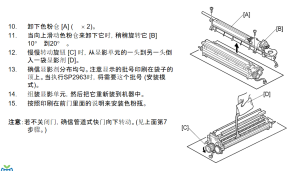
Link: https://pan.baidu.com/s/13pL-GMeN3NxMBDyaeWukwQ Extraction Code: phsi The screen displays "Please Wait" until the Make/Change Manager screen appears. The machine waits for the supervisor and administrator to enter the password. Site supervisors and system administrators are responsible for setting these passwords. The Home menu will not be displayed until these passwords are set. However, you can skip this screen to complete the installation It is recommended not to change the administrator user name and password. If you forget the password, you need to replace the NVRAM on the controller board. The executable SP5755-002. Cancel the password request screen and let you continue the machine installation with the power on. For more details on password settings, see "Important Security Considerations" in this section ". Default User Name: admin Password: Empty 6. Enter SP mode (System/Copy SP). 7. Close the front door. 9. Turn on the SP2963-002 while still in SP mode 10. Enter the developer lot number. (I. e., the number printed at the edge of the developer package.) 11. Open the SP2963-001 and touch [Execute]. In this SP, the following operations are performed; initial setting of developer, forced powder supply, and automatic adjustment around the drum. This step takes about 4 minutes. 12. When you see the "Done" message on the screen, touch [Exit]. 13. Press [Exit] twice to exit SP mode. |
Address of this article:https://073868.com/post/4144.html
Copyright Notice:
For relevant infringements, reports, complaints and suggestions, please send E-mail:weixiuwang68@qq.com







