
|
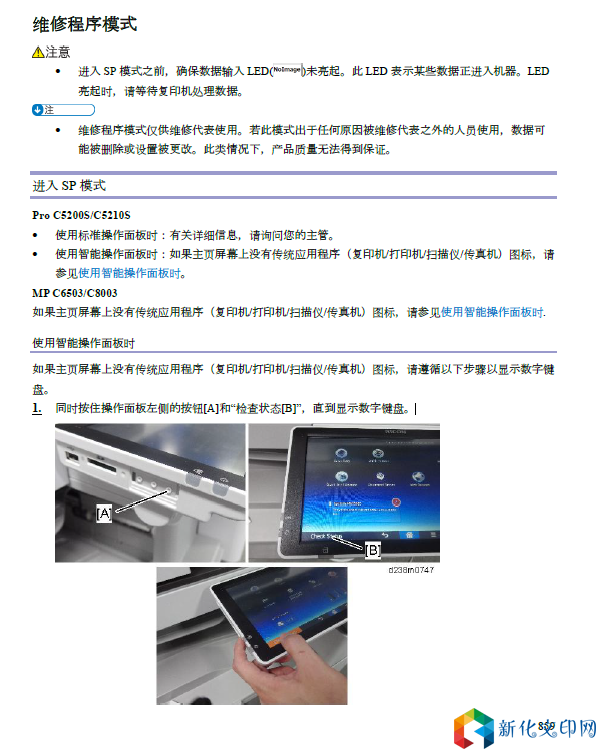
Ricoh Pro C5200S C5210S MPc6503 8003 Repair Manual Chinese Site Manual Enter SP mode Pro C5200S/C5210S When using the standard operating panel: For detailed information, please consult your supervisor. When using the smart control panel: If there are no traditional application icons (copier/printer/scanner/fax machine) on the home screen, please refer to when using the smart control panel. MP C6503/C8003 If there are no traditional application icons (copier/printer/scanner/fax machine) on the home screen, please refer to when using the smart operation panel When using the smart control panel If there are no traditional application icons (copier/printer/scanner/fax machine) on the home screen, follow these steps to display the numeric keypad. 1. Simultaneously press and hold the button [A] and "Check Status [B]" on the left side of the operation panel until the numeric keypad is displayed.
Link: https://pan.baidu.com/s/1eGkQM0ZWxkuzloAFiP9Yxg Extraction code: n5qj |
Address of this article:https://073868.com/post/4131.html
Copyright Notice:
For relevant infringements, reports, complaints and suggestions, please send E-mail:weixiuwang68@qq.com







