
|
1. 700DCP Overview Installation and Use of 2. Print Driver Hold: The print file is sent from the application program through this queue, and the file is converted into PS language and sent to the Fiery server hard disk through the network, waiting for the operator to use the Command Workstation software to operate and process it. (The print file can be checked by the preview option after rasterization, recommended)Function and use of 3. monitor Powerful user job management interface -Can manage 5 Fierys -Print queue management -Can edit job properties -Job preview, merge, edit -Archive -Job Log -Manage Fiery FreeForm -Import function -Fiery Settings -Supports Win95/98/NT 4.0 4. Color Principle and Color Management The perception of color depends on the following conditions:
5. System Software Installation * Fiery server system installation considerations
6. 700DCP Hardware Cardboard box 700DCP has five paper Trays: tray1 / tray2 / tray3 / bypassS Tray 1. 2. 3 can accept a variety of conventional paper formats, from SA3 to B5. 64~220g, 500 pages (80g) Tray 5: can accept 8 x 10 inches to 11 x 17 inches standard and non-standard paper, and A3 + (305 × 457) and SRA3(320 × 450) two kinds of oversized A3 paper, manual double-sided. 64~300g, p. 250. Print coated paper, transparencies, and paper over 128g should be printed from tray 5. Optional large-capacity paper tray: can accept 8.5 × 11 inch, A4, B5 or A5 size paper, 64-220g, 2000 pages. * Control Panel User Interface Touch Screen: Displays the printer's function menu Including: Meter Check Check consumable Tools Mode Principles of 7. Electrostatic Copying
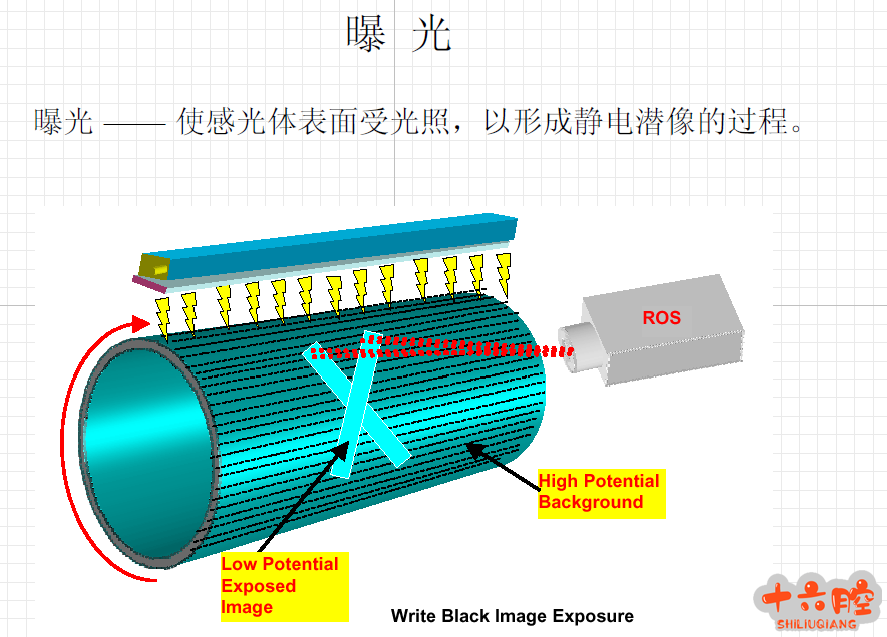
the steps of electrostatic copying:
① Do not store consumables upright ② Do not open the consumables when not in use, and do not store them in hot and humid places, near fire, direct sunlight and dust places ③ Before using consumables, please read the instructions and warnings on the consumables packaging box or container carefully. Fourthly, Fuji Xerox will recycle all the old consumables and accessories and carry out centralized treatment to reduce environmental pollution. ⑤ Paper storage: store in a closed cabinet or dry place to prevent moisture; The remaining paper used after opening should be properly packaged with wrapping paper and kept, preferably with desiccant. The paper should be placed flat instead of upright. Link:https://pan.baidu.com/s/1TooIJgOJTj2e2LA5Rtsh5w Extraction code: 1123 Judgment and exclusion of 10. common problems 1. Factors affecting machine performance and print quality ① Coated paper ② Higher toner concentration and larger coverage area ③ Most of the monthly printing volume uses thick paper and special paper that exceeds or approaches the specified limit. ④ Environmental impact: heat, humidity, air circulation, etc. ⑤ Paper state and storage method (below 25 °, humidity below 55%) The operator's skill and understanding of the application software, file management and color will affect the quality of the final printout. |
Address of this article:https://073868.com/post/3805.html
Copyright Notice:
For relevant infringements, reports, complaints and suggestions, please send E-mail:weixiuwang68@qq.com
Tags: #Training #Charging #Exposure #Developing #700







