
|
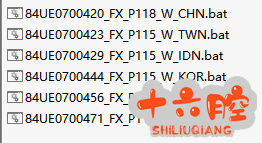
Xerox DocuPrint P118w,M118w,M118z Upgraded Firmware Board DataDocuPrint P118wAfter replacing the motherboard,P1Series 18DisplayP115series, I .e. cannotIdentify the printer,Unable toPrint.1. Install the maintenance driver "Maintenance USB Printer"× USB-connected printer* Install and maintain the driver "Maintenance USB Printer" and set it as the default printer2. Set the country code Double-click the corresponding bat file (in the P115_W_P118_W_PJL directory of the downloaded file VLlW folder): Under normal circumstances, the printer task sending icon will be displayed on the lower right of the computer desktop. After about 5 minutes, the icon will disappear. At this time, restart the printer manually. × Press the "Execute" key three times, the machine will automatically type the configuration, the motherboard installation is completed, the motherboard display serial number may be 012345..., no need to change.
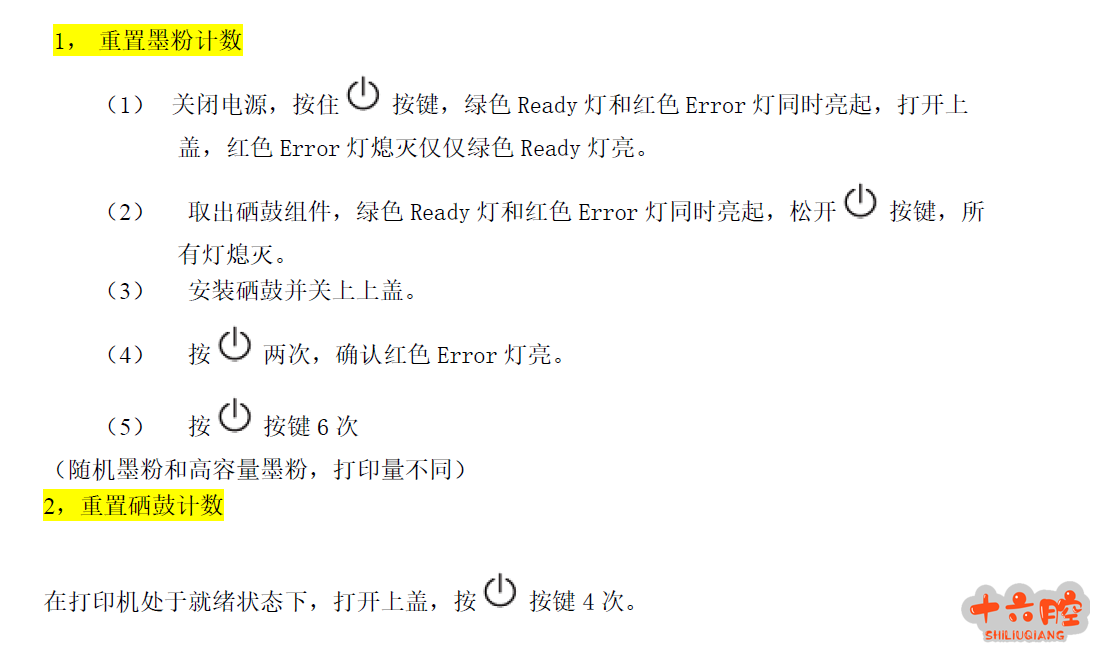
DocuPrint P115b, P118w toner cartridge/toner reset method
|
Address of this article:https://073868.com/post/1992.html
Copyright Notice:
For relevant infringements, reports, complaints and suggestions, please send E-mail:weixiuwang68@qq.com
Tags: #P118w #M118w #M118z #Upgrade firmware #Toner Reset






